
Platform
See what something costs before you spend a credit
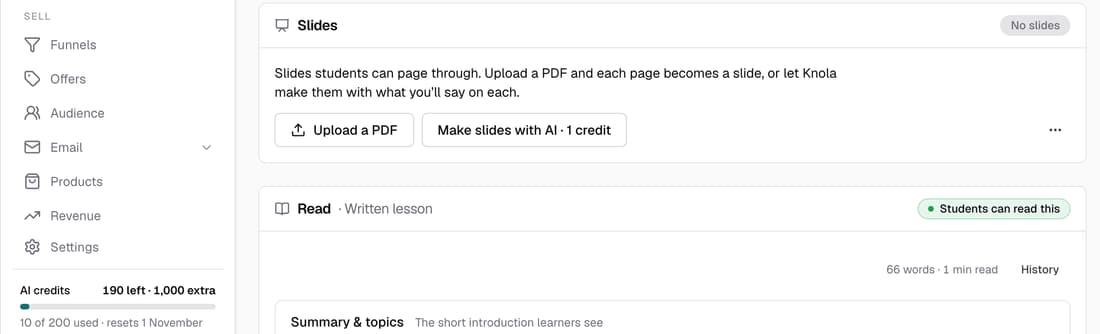
Every button that uses credits now shows its price and what you'll have left, and your balance sits in the sidebar. A big spend asks you first. If you're about to run out, Knola tells you before you start, not halfway through.
What’s changed
Before, not every button showed its price, and running short brought up a general credits wall. Now each button carries its price, and if you can't cover it you're offered a top-up or Pro before anything runs.
Who gets itEvery school
How it works
- Look for the price on any AI button, such as Make slides with AI · 1 credit.
- Your balance sits at the foot of the sidebar. Click it to top up.
- Short of credits? You're offered a top-up or Pro before anything runs.
- Owners can see every price in Settings ▸ Plan & billing, under What each action costs.
Good to know
- A click that costs 6 credits or more, or leaves you with fewer than 5, asks you first.
- Bought credits never expire, and are used after the rest.
- What used your credits, in Plan & billing, lists your school's last 30 charges, with any refund beside its charge.
- On Pro, the meter shows this month's credits and when they refill.