

Sell
Remove an offer you no longer sell
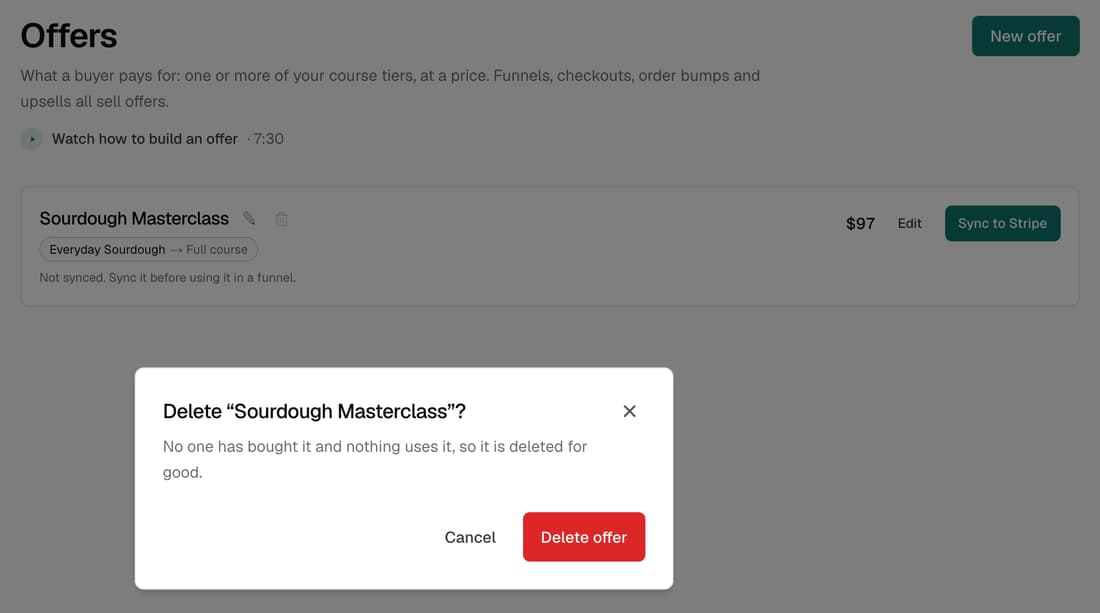
Each offer now has a bin icon. An offer nobody has bought is deleted. One with sales is archived instead, so its orders and buyers stay and you can restore it later. If a funnel still sells it, Knola tells you which funnel to change first.
What’s changed
Before, once you'd made an offer there was no way to remove it. Now you can delete or archive it from the Offers page, and Knola tells you which will happen before you confirm.
Who gets itEvery school
How it works
- Go to Offers and click the bin icon beside the offer.
- Read what will happen, then click Delete offer or Archive offer.
- If a funnel still sells it, change that funnel step to another offer first.
- To bring an archived offer back, find it under Archived and click Restore.
Good to know
- An offer with sales is never deleted. Archiving stops it selling, and its orders and buyers stay exactly as they are.
- Deleting is permanent, and only happens when nobody has bought the offer and nothing uses it.
- An offer still used at a funnel's checkout, payment plan, order bump or upsell can't be removed until you change that step.
- Archived offers no longer appear when you pick an offer for a new funnel, a checkout or a button link.