Email marketing and automation
Grow your list. Email it. Sell your course.
Give something away free, collect the email of everyone who wants it, and send emails that lead them to your course. Some you send yourself. Some go out on their own while you work. All of it sits next to your courses, and you see the sales each email made.
No separate email tool · Pay once · No monthly fee
Live from Knola · updated daily
- courses built on Knola
- 1,300+
“I’ve tested many course platforms over the past few years and never found one that I liked… I now have 3 courses fully online. Amazing.”
 Chris WalkerCreative Worlds
How it works
Most courses don’t struggle because they’re bad. Nobody knows they exist.
The creators who sell month after month nearly all do the same four things. Knola does each of them, in the same place as your course.
- 01
Give something away
A free download and a sign-up page for it, or a form on your own website.
See it - 02
Emails that send themselves
A welcome series, a nudge to buy, a hello to new students. Written once.
See it - 03
Write to your list
Say what the email is for. AI writes it in your voice, and you send it.
See it - 04
See what sold
Next to every email: the sales, seats and enrolments that came from it.
See it
01 · Give something away
A free download. Their email in return.
A checklist, a short guide or your first lesson. It’s the reason a stranger gives you their email, and the start of every sale that follows.
- Seven ready-made sign-up pages. Say what you’re giving away and Knola fills one in, on your brand.
- A sign-up form for any page, in your school or on your own website. Paste one tag into WordPress, Squarespace, Wix, Webflow or Framer.
- The download goes out by itself the moment someone signs up.
- Ask one question on the form, and tag people by their answer.
- Each form shows its views, its sign-up rate and the sales it led to.
Free download
The companion planting chart
Companion chart form Live
1,240
views
31%
signed up
£1,127
led to
The chart is emailed the moment they sign up
02 · Emails that send themselves
Write it once. It sells every day after.
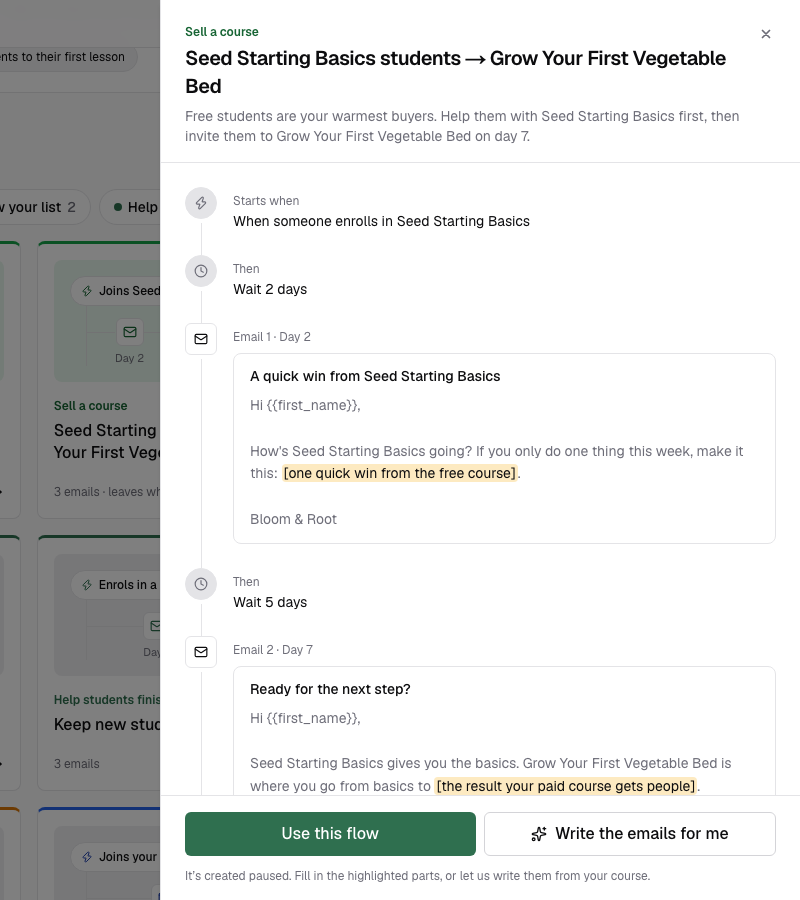
A flow is a set of emails that starts when someone does something. Each person moves through it on their own clock, and you see who’s waiting for which email.
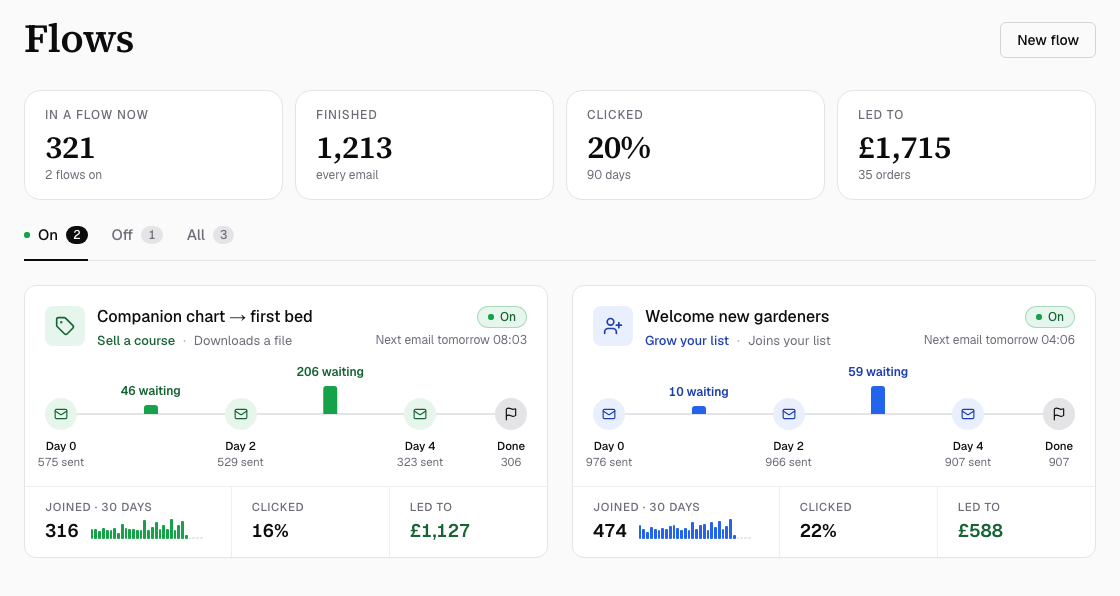
Start a flow when someone…
- Joins your list
- Downloads
- Leaves checkout
- Buys
- Enrols
- Finishes a course
- Joins a webinar
- Is tagged
- Payment fails
- Goes quiet
Describe it in one sentence
Knola writes the emails, sets the waits and picks what starts the flow, from your courses and in your voice.
Or start from a ready-made flow
Welcome new subscribers, invite free students to your paid course, bring back people who left the checkout.
Buyers leave by themselves
Selling flows end the moment someone buys, so nobody gets a pitch for a course they own.
Nothing sends until you say so
Every new flow starts paused. Read each email, then switch it on.
03 · Write to your list
A new course, a live class, a sale. Tell everyone in minutes.
A broadcast is one email to the people you choose. Write it yourself, or say what it’s for and let AI write it from what’s in your school.
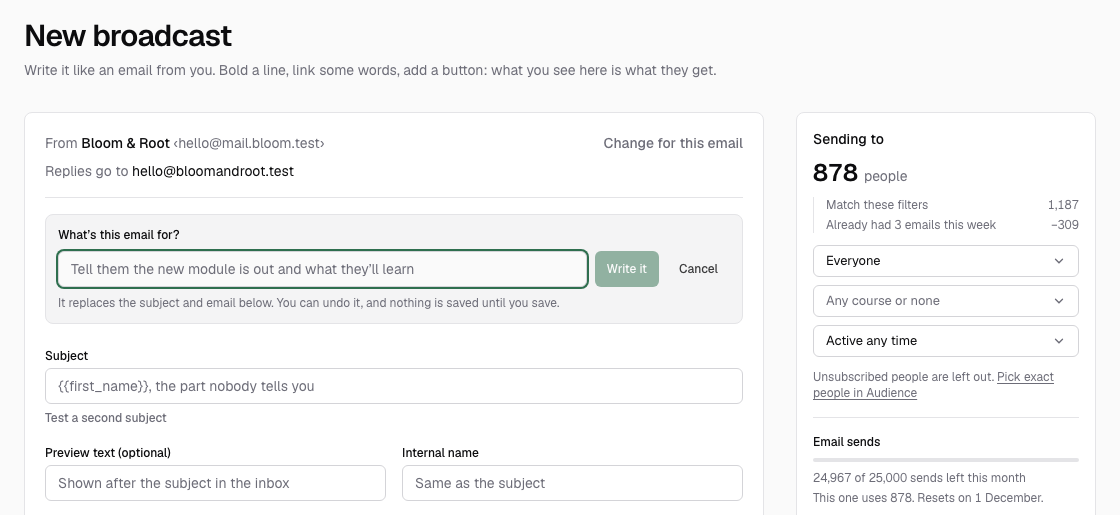
Write it with AI
Say what the email is for. AI writes the subject and the email, and learns how you sound from what you’ve sent.
Pick who gets it
Everyone, the students of one course, a tag, or the people who’ve gone quiet. Unsubscribed people are always left out.
Test two subjects
Send each subject to part of your list. The one more people click goes to everyone else.
Send now or later
Schedule it up to 90 days ahead. Send yourself a test first, free.
04 · See what sold
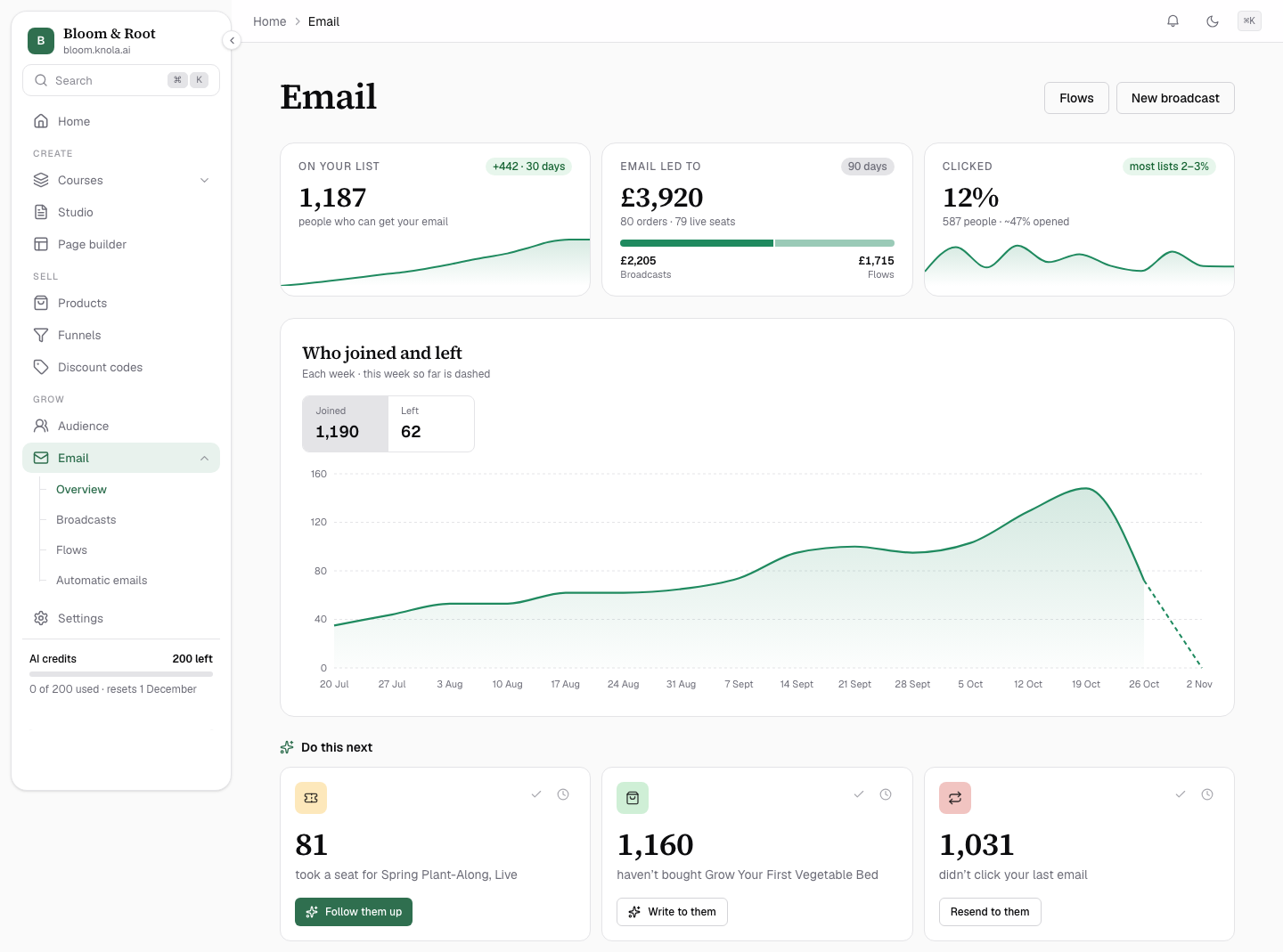
Not only opens and clicks. The sales.
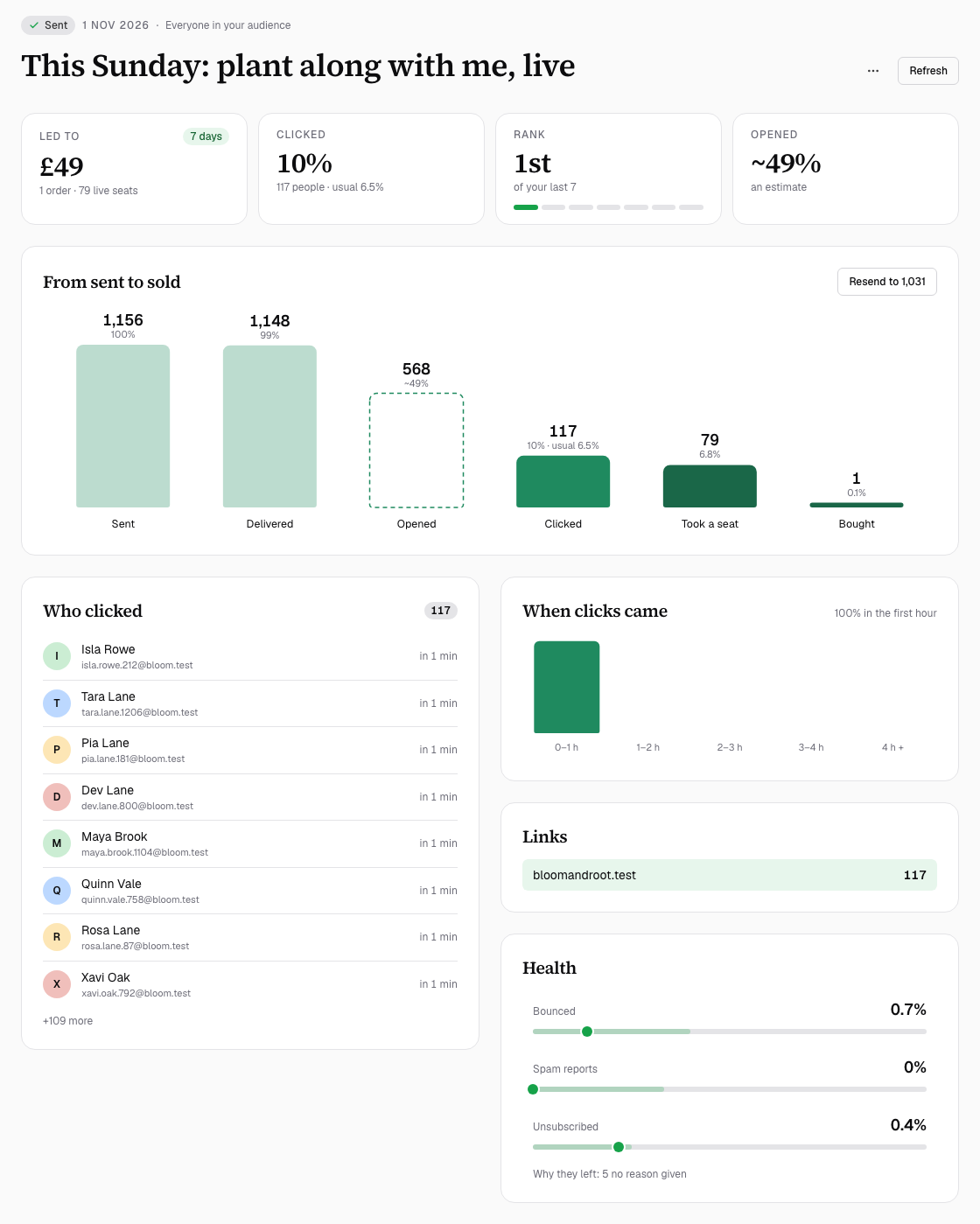
Your email tool and your course platform are the same place, so Knola can see what happened after each email: the sales, live seats and enrolments that followed it.
- Led to: what each broadcast and flow brought in, side by side.
- Who clicked, when, and on which link.
- Resend to the people who didn’t click, with a fresh subject.
- Do this next: suggestions from your own numbers, each with the button that does it.
Already have a list?
Bring it with you. Nobody gets left behind.
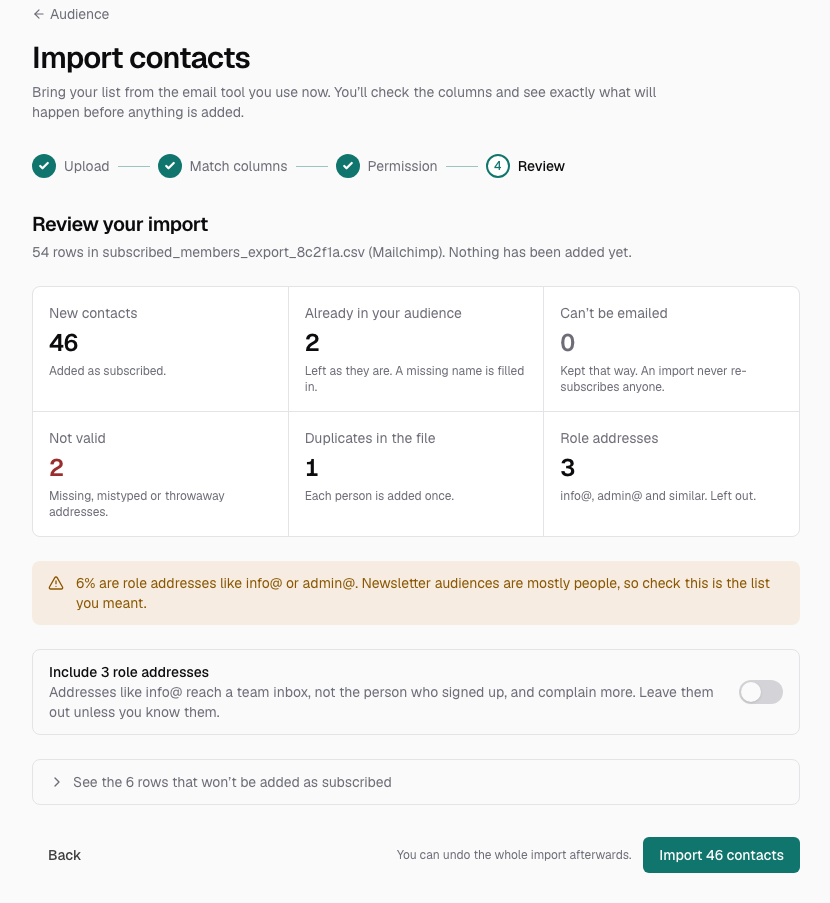
Export your contacts from the tool you use now and drop the file into Knola. It matches the columns for you and shows exactly what will happen before anyone is added.
- Kit
- Mailchimp
- MailerLite
- ActiveCampaign
- beehiiv
- Substack
- Kajabi
- or any CSV
- Anyone who unsubscribed there stays unsubscribed here.
- Importing never emails anyone, and imports don’t start your welcome series.
- Your licence counts the emails you send, not the people on your list.
Emails that land in the inbox.
From your own domain
Your emails come from your business, not from Knola. The check on your domain usually finishes within an hour.
A second pair of eyes
Knola checks your first broadcasts before they go out, to keep your emails landing in inboxes.
Never too many
Set the most emails one person gets in a week. Broadcasts and flows respect it together.
The rules, handled
An unsubscribe link and your postal address go in every footer. Unsubscribes and bounces are never emailed again.
No separate email tool
Email is included in your licence. One payment to start.
Most email tools charge you every month for the people on your list, before you’ve sold a thing. Knola counts the emails you send instead. So while your list is small, you don’t pay every month for the privilege.
Included from day one
Email comes with your licence. No extra tool to sign up for, and nothing to connect.
Sends, not subscribers
A bigger list doesn’t mean a bigger bill. You only use sends when you email.
Course emails are free
Receipts, access links and course reminders never use a send.
“I believe Knola is the future platform of online education: powerful, intelligent, accessible, and created with both the teacher and the learner in mind.”

Joy Hauʻoli Sutherland
Co-Founder of LVH Brands
“What I love most about Knola is how easy it makes the course-creation process, but even more importantly, the support. When I have a question or need help figuring something out, I feel like there are real people who want to help, not just a support ticket system.”

Lori Kantor
Universal Educational Services“Investing in Knola has been the best decision ever for my creative learning business. I produce lots of content for my students and I needed a way to make it easy for them to access. Knola makes it easy to get my content online, and I love the AI written tools that let me turn my recordings into written lessons too.”
Carol Rodriguez
Creative design lecturer
“What sold me wasn’t just the platform, it was the people. I asked a question expecting to wait days and got a real, helpful answer within the hour. You can tell Knola is built by people who actually want you to succeed, not just take your money.”
Sophie Richards
PeaceLoveSerenity
“Knola has been perfect for me as a beginner. It’s helped me create my first course, and without the worry of having to pay every single month whilst I build out my marketing.”
Moira Sulimani
Course creator
“I’d been sitting on my course idea for nearly two years, convinced I’d get around to it one day. I’d written a couple of books before but never sold an online course. I came across the Knola offer and my experience so far has been great. I wish I had found it sooner.”
Richard A
Business Owner
“I love how Knola combines the ability for me to upload my own course material, whilst also giving me the option to produce more from it with the AI tools. It’s a solid platform with great support.”
James T.
Course creator
“I would recommend Knola to anyone wanting to host a course online. My students have even commented on how easy it is to use and it has saved me a lot of money.”
Kristian B.
Course creator
Free · about 10 seconds
Start with the course. See it free.
Type what you do or know. Knola shows you a course you could sell, with its full outline. No card, no account.
Ready now? Get Knola Studio →
FAQ
A few things you might be wondering.
Do I still need Kit, Mailchimp or another email tool?
No. Knola sends your broadcasts and flows itself, from your own domain, so you can run your email without another tool. Your sign-ups, students and sales are already in one place.
I already have a list somewhere else. Can I bring it into Knola?
Yes, and it’s part of your licence. Export your contacts as a CSV from Kit, Mailchimp, MailerLite, ActiveCampaign, beehiiv, Kajabi or any email tool, then drop the file into Audience ▸ Import contacts. Anyone who unsubscribed there stays unsubscribed here, and importing never emails anyone.
How many emails can I send?
Every email in a broadcast or a flow uses one send. A Knola licence comes with sends that never expire, Knola Pro includes 25,000 a month, and you can add 50,000 more for $25 whenever you need them. Receipts, access links and course reminders never use a send, and you pay for sends, not for the size of your list.
Can AI write my emails?
Yes. Describe a flow in one sentence and Knola writes the emails, sets the waits and picks what starts it. In any email, Write it with AI writes the subject and the email from what is in your school, in your voice. Everything opens as a draft or a paused flow, and nothing sends until you say so.
What is the difference between a broadcast and a flow?
A broadcast is one email you send once, to the people you choose. A flow is a set of emails that starts by itself when someone does something, such as joining your list, buying or finishing a course, and keeps working for everyone who comes after.
Do I need my own email domain?
Yes, to send to your list. You connect it once in Settings ▸ Email, and the check usually finishes within an hour. You can write broadcasts and build flows while it checks.
Who gets my emails?
Only people who agreed to hear from you: people who signed up on a form, downloaded a freebie, joined a webinar or said yes after buying. Anyone who unsubscribes is never emailed again. Buyers who were never asked still get their receipts and course emails.
How do I know which emails led to sales?
Because your email and your courses are in one place, every broadcast and flow shows what it led to: the sales, live seats and enrolments that followed it. Clicks show next to it, and who clicked which link.
Building your course was never the finish line. Selling it is.
Knola builds the course, gives it a home, and now finds the people who want it.
Get Knola StudioPay once · No monthly fee · Email included