

Platform
Invite a teammate to one course, and only that course
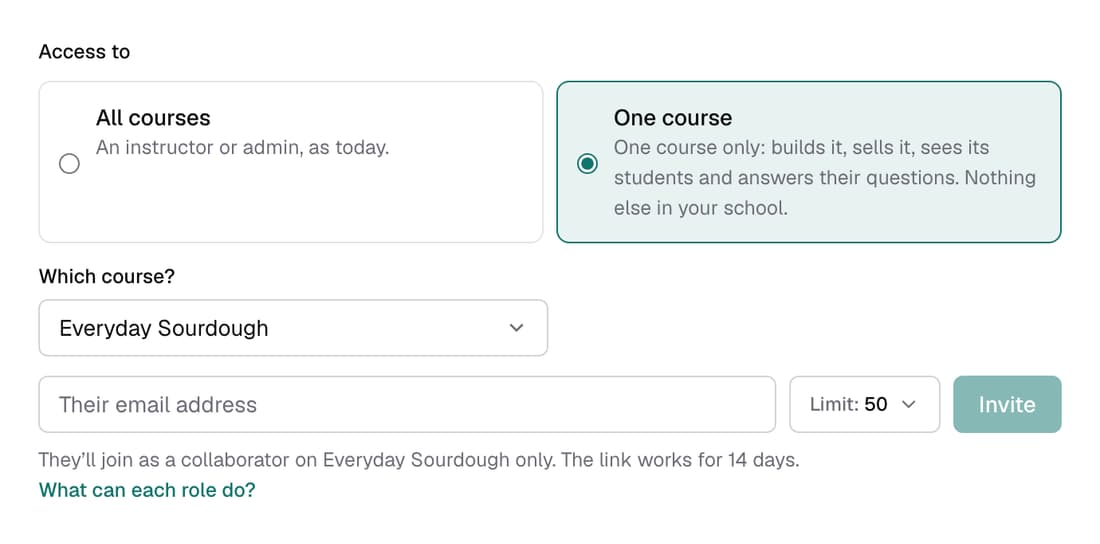
A collaborator can build their course, see its students, answer their questions and sell it with their own offers and pages. They can't see your other courses, your other students or the rest of your revenue. Invite them from Settings ▸ Team and choose One course.
What’s changed
Before, anyone you invited saw every course in your school. Now you can give a teammate one course only, to build, teach and sell.
Who gets itPro schools
How it works
- Open Settings ▸ Team.
- Under Access to, choose One course, then pick it under Which course?
- Type their email address, set their monthly AI credit limit and click Invite.
- They accept from the email and land straight on their course.
Good to know
- The invite link works for 14 days.
- They use your school's AI credits, up to the monthly limit you set. It starts at 50.
- Discount codes, giveaways, your home page, digital products and payouts stay yours alone.
- Their funnels and pages count towards your plan's limits. To open up every course, choose Give access to all courses.