AI
Slides made from your lesson, in your own words
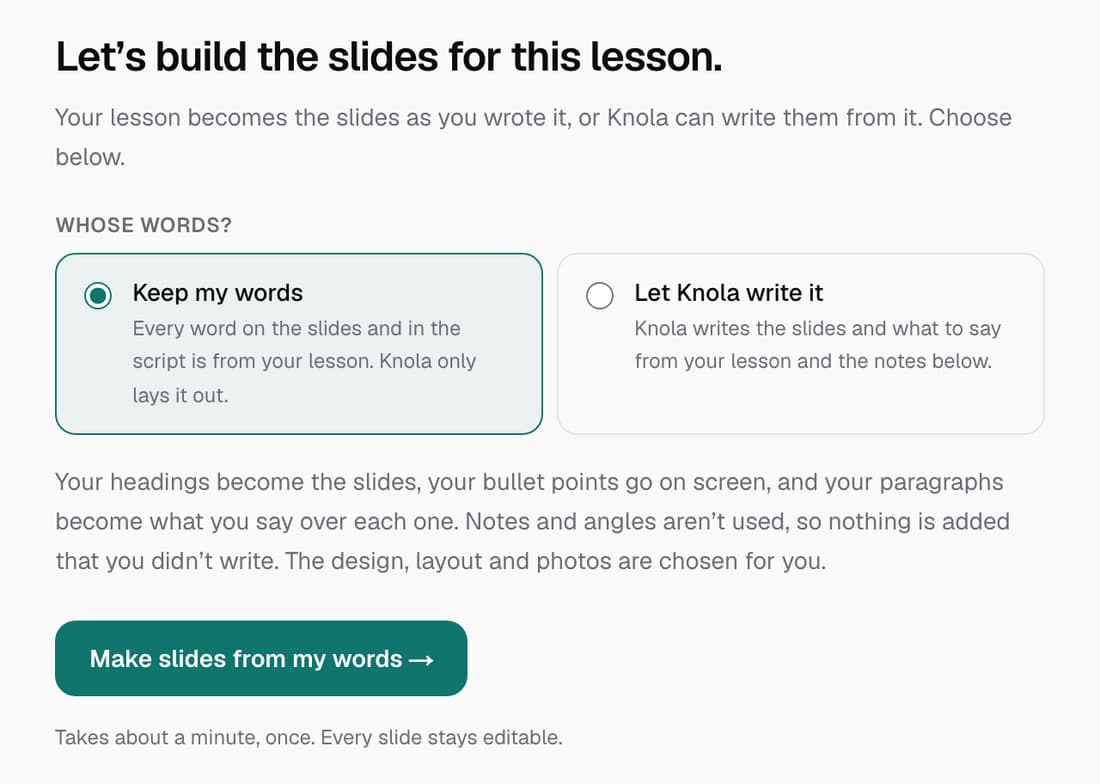
When you make slides from a lesson you wrote or imported, Knola can now keep your words. Choose Keep my words and everything on the slides and in the script comes from your lesson: headings become slides, bullet points go on screen and paragraphs become what's said. Knola still handles the layout, icons and photos.
What’s changed
Before, Knola always rewrote your lesson into its own slide text and script. Now you can keep every word as you wrote it and let Knola do only the design.
Who gets itEvery school
How it works
- Open the slide brief for a lesson that has written text.
- Under Whose words?, choose Keep my words.
- Click Make slides from my words. It takes about a minute.
- Edit any slide afterwards. Every slide stays editable.
Good to know
- It costs the same as other slides: 1 credit. The button shows the price.
- Your notes and angles aren't used, so nothing is added that you didn't write.
- It's picked for you on lessons you wrote or imported, and on Let Knola write it for lessons Knola wrote.
- A lesson with no written words can't use it, and you aren't charged.