

NewKnola Live · Sessions, webinars and coaching
Teach it live. Sell it from your own school.
Webinars, workshops, cohort calls and coaching, built into your Knola school. Sell the seat, make your offer in the room, and keep the recording as a lesson or a product. No other meeting tool, and nothing for your audience to install.
In every Knola licence · Pay once · No monthly fee
Live from Knola · updated daily
- courses built on Knola
- 1,600+
“I’ve tested many course platforms over the past few years and never found one that I liked… I now have 3 courses fully online. Amazing.”
 Chris WalkerCreative Worlds
Seven ways to go live
What do you want to run?
Live webinars for an audience. Coaching classes and group calls. One-to-one sessions with clients. Knola Live runs every one of them from your own school.
01 / 07
Get paid before you teach
Charge for a seat at your workshop, your masterclass or your training. Knola Live builds the ticket page, takes the payment and sends every buyer their way in.
- People pay before you teach a word
- Limit the places, and let them sell out
- Reminders go out for you, so people turn up
Live workshop
Plan your first four videos
Paid. The join link is on its way.
Set up in a few clicks
A title, a time and a price. Knola does the rest.
A live session, a coaching call or a webinar takes a few clicks to set up. You don’t design a page, connect a checkout or write an email. Knola Live does all three.
The page
A sign-up page or a ticket page for your session, on your brand. You don’t design it.
The checkout
Set a price and people pay before they get in. The money goes to your own Stripe account.
The emails
A confirmation, the way in, and reminders before the start, sent for you.
Inside your live room
Everything you need to hold a room.
Your audience joins in the browser, inside your school. Nothing to download, and no other meeting tool. And you get every tool a great session needs.
01 / 06
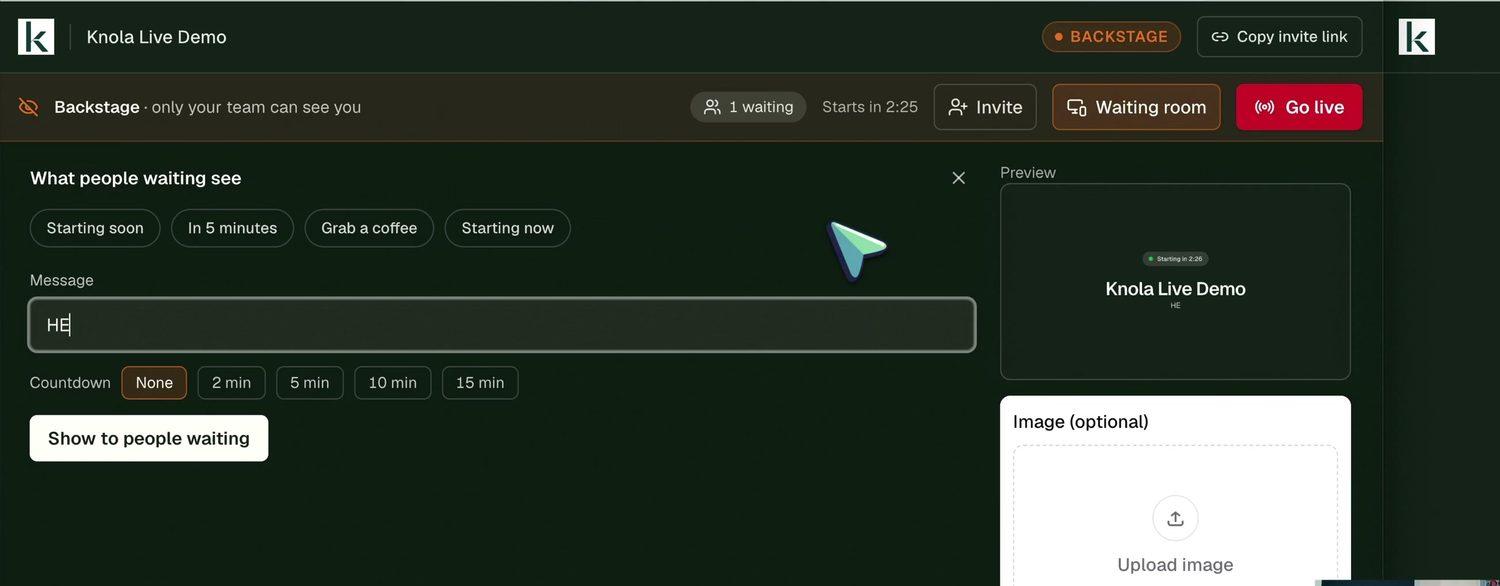
Walk on when you are ready
You are in the room before anyone can see you. Your audience waits on a page you control, with your message and a countdown to the start.
- Check your camera, your slides and your team
- Tell people what is coming while they wait
- Go live on your word, not the clock’s
Also in the room
- Raised handsSomeone wants to speak? They raise a hand, and you bring them on.
- Co-hostsRun the session with a partner. They get their own link in, and they wait backstage with you.
- ModeratorsA helper who looks after the questions and the chat, so you can keep teaching.
- Guest speakersInvite a guest to present. They join as a speaker, with their own link.
- ReactionsYour audience can react as you teach, so you can feel the room.
- Recorded for youEvery session is recorded and written down, with nothing to switch on.
Sell while you teach
Your offer, on every screen in the room.
The best moment to sell your course is when people have just learned from you. Knola Live puts your offer in front of every person in the session: the product, the price, a countdown and a Buy button. You keep teaching. They buy.
- Any course or product in your school
- A countdown, so people decide in the room
- They pay in a new tab, and nobody leaves the call
On offer now
The Two-Hour YouTube Channel
Opens in a new tab. The call keeps going.
This is what your audience sees.
Every session becomes a product
Teach it once. Sell it again and again.
A live session used to be gone the moment it ended. With Knola Live, the end is where it starts to earn: the recording, the notes and a full transcript are made for you, and the session goes straight into a course as a lesson.
✓ You’ve ended the call · 60 min
Knola Live Demo
Recording readyHow it went Live numbers from the call
- Registered
- 248
- signed up
- Came live
- 131
- 53% of sign-ups
- Watched on average
- 41 min
- of 60
- Stayed past halfway
- 104
- of the 131 who came
- Questions
- 37
- 29 answered
- Rating
- 4.8
- 62 rated it
The 37 questions and everyone who came →
What do you want to do next?
- 01It is recorded for youEvery session, with no button to remember. Only you can see it until you say so.
- 02You see how it wentWho signed up, who came, how long they stayed, and every question they asked.
- 03The notes are writtenKnola writes notes and a full transcript from the call. Fix any word you like.
- 04It becomes a lessonPut it in a course, choose the module, and it is a new lesson for your students.
- 05It becomes a product you can sellIt does not have to go into a course you already have. Sell the recording on its own, as a new product.
No separate webinar tool
Knola Live is in your licence. Every feature.
Every level gets every Knola Live feature. The levels differ only in how many people can be in a session, and in your attendee hours. One attendee hour is one person in your session for one hour.
Knola Solo
10
attendees in a session
30
attendee hours with your licence
Knola Studio
25
attendees in a session
100
attendee hours with your licence
Knola Pro
50
attendees in a session
50
attendee hours added each month
Knola Business
100
attendees in a session
300
attendee hours added each month
The hours with a Solo or Studio licence are a one-time total. Knola Pro and Knola Business are two subscriptions you can move up to at any time, inside your account.
“For an author like myself, or course creator who wants to share the knowledge they have, then Knola really is a must have… Knola is different, go and have a look for yourself, I’m glad that I did.”

Frank Mcbride
Author
“I create short training courses and rigorous certifications for the distilled spirits industry. For the price, this has been the best platform I’ve found for building a legitimate business. Support is very responsive and takes action quickly. I’ve made several requests, and each one has been handled either with instructions or added functionality.”

Jay Puckett
Founder, Spirits Education Academy“I believe Knola is the future platform of online education: powerful, intelligent, accessible, and created with both the teacher and the learner in mind.”

Joy Hauʻoli Sutherland
Co-Founder of LVH Brands
“What I love most about Knola is how easy it makes the course-creation process, but even more importantly, the support. When I have a question or need help figuring something out, I feel like there are real people who want to help, not just a support ticket system.”

Lori Kantor
Universal Educational Services“Investing in Knola has been the best decision ever for my creative learning business. I produce lots of content for my students and I needed a way to make it easy for them to access. Knola makes it easy to get my content online, and I love the AI written tools that let me turn my recordings into written lessons too.”
Carol Rodriguez
Creative design lecturer
“What sold me wasn’t just the platform, it was the people. I asked a question expecting to wait days and got a real, helpful answer within the hour. You can tell Knola is built by people who actually want you to succeed, not just take your money.”
Sophie Richards
PeaceLoveSerenity
“Knola has been perfect for me as a beginner. It’s helped me create my first course, and without the worry of having to pay every single month whilst I build out my marketing.”
Moira Sulimani
Course creator
“I am in love with your product. I am going to be launching my own course with it. It has given me great hope and for that, I thank you.”

Gabriela Rudnicka
Content creator
“I’d been sitting on my course idea for nearly two years, convinced I’d get around to it one day. I’d written a couple of books before but never sold an online course. I came across the Knola offer and my experience so far has been great. I wish I had found it sooner.”
Richard A
Business Owner
“I love how Knola combines the ability for me to upload my own course material, whilst also giving me the option to produce more from it with the AI tools. It’s a solid platform with great support.”
James T.
Course creator
“I would recommend Knola to anyone wanting to host a course online. My students have even commented on how easy it is to use and it has saved me a lot of money.”
Kristian B.
Course creator
Free · about 10 seconds
Start with the course. See it free.
Type what you do or know. Knola shows you a course you could sell, with its full outline. No card, no account.
Ready now? Get Knola Studio →
FAQ
A few things you might be wondering.
Do I need another meeting or webinar tool?
No. Knola Live runs in your school. You do not send a meeting link from another tool, and your audience has nothing to install: they join in the browser.
What can I run with Knola Live?
Paid sessions and workshops, free webinars, a series on one ticket, evergreen webinars that play a session you already ran, live calls for the students of a course, cohort courses, and one-to-one coaching.
Can I charge for a session?
Yes. Set a price and Knola builds the ticket page and the checkout. Payments go to your own Stripe account.
Can I sell my course during a session?
Yes. Show an offer puts one of your products in front of everyone in the room, with a countdown and a Buy button, while you keep teaching.
What happens to the recording?
Knola records the session and only you can see it first. Publish it to the people who signed up, sell it, or add it to a course as a lesson. You can also download the recording and use it anywhere you like.
How many people can join, and how much live time do I get?
Every licence has every Knola Live feature. Solo has up to 10 attendees in a session and 30 total attendee hours. Studio has up to 25 attendees and 100 total attendee hours. One attendee hour is one person in your session for one hour, so 10 people for 1 hour uses 10. The hours are a one-time total that comes with your licence. Want more attendees or more hours? You can upgrade to Knola Pro or Knola Business at any time, inside your account. Pro has up to 50 attendees in a session and adds 50 attendee hours each month. Business has up to 100 attendees and adds 300 attendee hours each month.
I already have a Knola licence. Do I get Knola Live?
Yes. Knola Live is in every paid Knola school. Open Live in your school’s menu.
Can I run a session with someone else?
Yes. Add a co-host, a moderator to look after the questions, or a guest speaker. Each one gets their own link in.
Your course teaches while you sleep. Now teach it live, too.
Knola builds the course, gives it a home, and now puts you in the room with the people who want it.
Get Knola StudioPay once · No monthly fee · Knola Live included