How to customise the emails Knola sends for you
Preview every email Knola sends in your school’s name, rewrite the subject and opening line, and decide whether optional emails send at all.

 By Knola4 min read
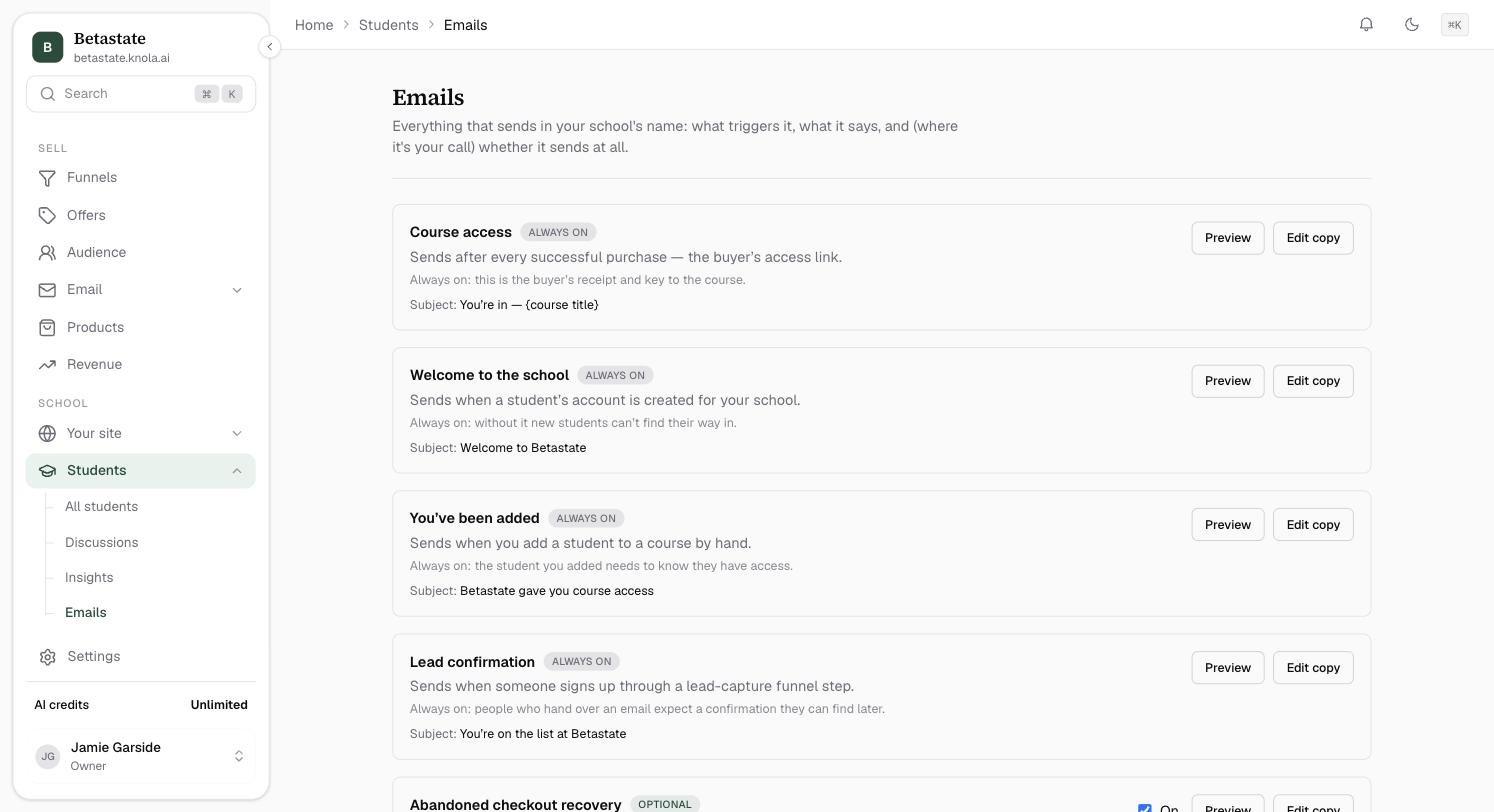
Knola sends a small set of emails on your behalf: access links, welcomes, certificates. Students → Emails is the switchboard: every one of them listed with what triggers it, a live branded preview, and (where it’s your call) an on/off switch. Nothing sends in your name that you can’t see on this screen.
Open Students → Emails
In the sidebar, open Students under School, then Emails. Each card is one email: its name, when it sends, its current subject line, and a badge: Always on for transactional emails your students genuinely need, Optional for the ones you may switch off. The catalog:
- Course access: after every successful purchase; the buyer’s access link. Always on.
- Welcome to the school: when a student’s account is created for your school. Always on.
- You’ve been added: when you add a student to a course by hand. Always on.
- Lead confirmation: when someone signs up through a lead-capture funnel step. Always on.
- Abandoned checkout recovery: one reminder when a buyer enters their email at checkout but doesn’t finish. Optional.
- Certificate issued: the moment a student completes a course whose tier awards a certificate. On by default.
- Question answered: the moment you reply to a student's question on a lesson, with the first part of your answer and a link back. On by default.
Preview the real, branded email
Click Preview on any card. What you see is the actual email filled with sample data, your school name, your logo and your brand colour, plus any copy overrides you’ve saved. It’s exactly what the recipient sees, not a mock-up.
Rewrite the subject and opening line
Click Edit copy. Every email lets you override the Subject. Leave it blank to keep the stock line shown in the placeholder. On emails that support it (Course access, Abandoned checkout recovery, Certificate issued), you can also rewrite the opening paragraph; structure, buttons, and the legal footer stay fixed so deliverability and the access link can’t break. Click Save, then Preview again to see your words in place.
{course title} in the Course access subject fills in per purchase.Decide whether optional emails send
Cards marked Optional carry an On / Off switch. Today that’s Abandoned checkout recovery. It recovers real revenue, but it emails people who didn’t buy; off means abandoned checkouts are simply forgotten. How it decides who to email: abandoned checkout recovery. Transactional emails have no switch, and each card says why: the buyer’s receipt and course key, for instance, is not optional mail.
Can I turn off the emails Knola sends to my students?
Only the optional ones: Abandoned checkout recovery has an on/off switch. Transactional emails (course access, welcome, added-to-course, lead confirmation) always send, because without them paying students can’t reach what they bought.
Can I fully rewrite the email templates?
You can override every subject line, and the opening paragraph on the emails that support it. The structure, buttons and legal footer are fixed. That’s what keeps the access links working and the emails out of spam folders.
Do these emails use my branding?
Yes. Your logo and brand colour from Branding appear on every one of them, and the Preview on each card shows the exact result.