

Here's where your audience contacts come from
See how every email you capture (funnels, page lead blocks, your school page) becomes one contact you can search, filter, export and delete.

 By Knola5 min read
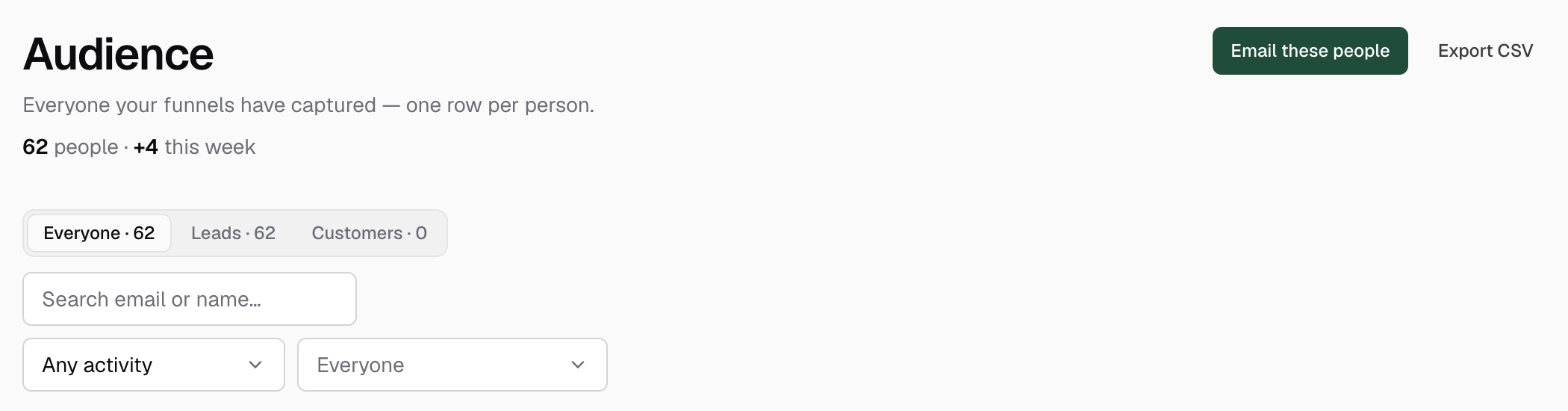
The Audience screen is one row per person. However many times someone gives you their email (a lead magnet, a waitlist, your school page), they’re still one contact, with their whole capture history underneath. This guide explains where contacts come from, how the filters slice them, and what you can do with the result.
Where contacts come from
Every capture surface feeds the same list; there is nothing to connect:
- Lead capture steps in your funnels, the classic squeeze page.
- Lead capture blocks on standalone pages.
- The email form on your school home page (“Not ready to enrol?”).
- School sign-ups and product activity: people who create a student account, claim a lead magnet, or buy, matched into the same contact by email.
The moment a lead lands you also get a “You got a lead 🎉” email with their address, the funnel it came from, and your running total: one email per new lead, never repeats for a re-submit.
Search, lifecycle, and the activity filter
The top of the list is a filter bar. The segmented control splits Everyone into Leads and Customers, and “customer” is worked out automatically, not a tag you apply: a lead becomes a customer the instant an order is paid, and a fully refunded buyer honestly reverts to lead. Next to it, search matches email or name.
The activity select cuts by real behaviour across every signal Knola holds (sign-ins, downloads, and captures): Active · last 7 days, Active · last 30 days, Active · last 90 days, Inactive · 30+ days, or Inactive · 90+ days. You can also filter to subscribers of any (or specific) courses, and by progress: Over 50% complete or Over 80% complete.
Source chips: how each person found you
Under the search bar, one chip per capture source shows its contact count: a chip for each funnel, each standalone page, School signup, and per-product Claimed (lead magnet) and Bought chips. Click any combination to filter; chips union together, so “Lead magnet + Webinar waitlist” means anyone who came through either.
Expanding a contact’s row shows their individual capture history: “Signed up via …”, source by source, with timestamps.
Export to CSV, filters included
The Export CSV button downloads your list, and it honours whatever filters are active, switching to Export CSV (filtered) so you know you’re getting the segment on screen, not everyone. That makes any filtered view a ready-made import for your email tool.
To send leads out automatically instead, the “Send new leads somewhere” section at the bottom takes a receiving link per funnel: each new lead is delivered there the moment it lands. It works with Zapier, Make, or n8n, which can forward to Kit, Mailchimp, or any email tool. A Send test button sends a sample lead so you can check the far end first.
Deleting a contact (GDPR)
When someone asks to be forgotten, expand their row and click Remove contact, then confirm with Yes, remove. That deletes the person and their capture history from your audience. It’s the right-to-erasure control, so it’s permanent. One thing stays: if they had unsubscribed, bounced or complained, we keep a scrambled fingerprint of the address (never the address itself), so a later sign-up or purchase can’t quietly put them back on your list, and the unsubscribe links in emails they already have keep working.
Does the same person appear twice if they sign up through two funnels?
No. Contacts are one row per person per school: a second capture adds to their history and their source chips, never a duplicate row.
How do I get my Knola leads into my email tool?
Two ways: Export CSV (filtered or full) for a manual import, or paste your tool’s receiving link under “Send new leads somewhere” and every new lead is sent there in real time. Zapier, Make, or n8n can forward it to Kit, Mailchimp, or any email tool.
How do I delete a lead’s data under GDPR?
Expand their row on the Audience screen and click Remove contact, then Yes, remove. The contact and their capture history are permanently deleted.