Here's how funnels work in Knola
Understand what a Knola funnel is (pages wired into one buying flow) and create yours from AI, an offer or a template in a few clicks.

 By Knola5 min read
A funnel is the public, multi-step flow a visitor walks through on the way to buying: pages wired together that turn visitors into leads and buyers. Instead of one sales page with a buy button, a funnel chains pages in order: pitch, payment, extra offer, confirmation, each step handing the visitor to the next.
Every step has a role
A funnel is a chain of steps, and each step has a job. The + Add step menu on the funnel canvas offers:
- Sales page: make the pitch for your offer.
- Lead capture: collect an email before they buy.
- Checkout: take the payment. See the checkout step.
- Upsell: offer something extra after they buy.
- Downsell: a cheaper option if they say no.
- Thank-you: confirm and point to what’s next.
- Content page: a plain page: about, FAQ, anything.
Sales page, lead capture, checkout and thank-you are one per funnel; you can add several upsells and content pages. Each step owns a page you edit like any other, and the steps are wired together on the funnel canvas.
Three ways to create one
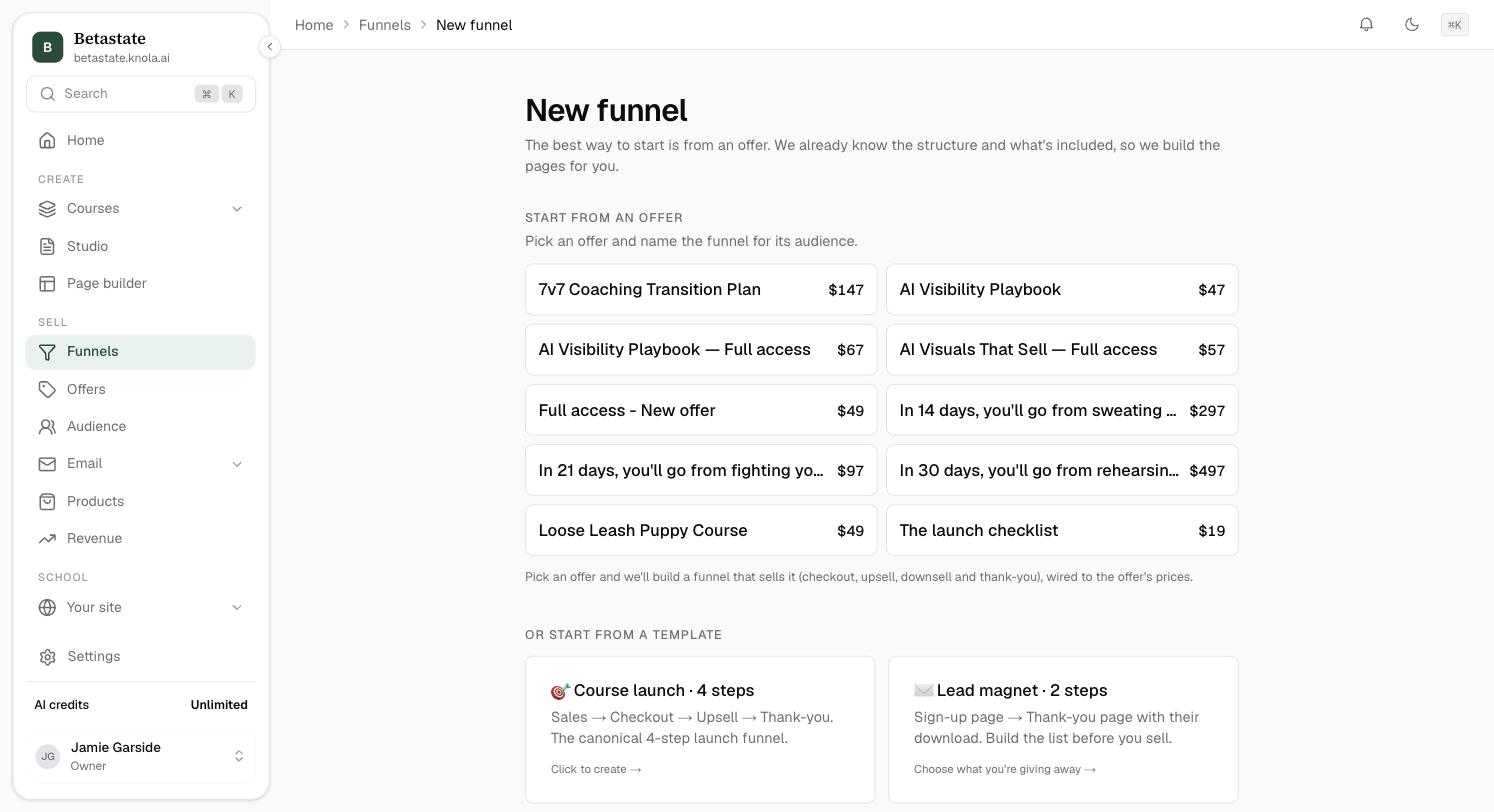
Go to Funnels and click + New funnel. The New funnel page gives you three starting points:
- Start from an offer: the recommended route. Pick an offer, name the funnel for its audience, and click Build funnel from this offer →. Knola already knows the structure and what’s included, so it builds the pages for you (checkout, upsell, downsell and thank-you, wired to the offer’s prices).
- Or start from a template: six proven structures, each created in one click: Course launch, Lead magnet, Cohort waitlist, Webinar funnel, Coaching sales and Free chapter.
- Or describe what you’re launching: write a couple of sentences about your launch (price, course name, the steps you want) and click Generate funnel. Knola AI composes the structure, generates the pages and wires the steps together, then opens the canvas. You can point it at one of your courses with the Use course: picker.
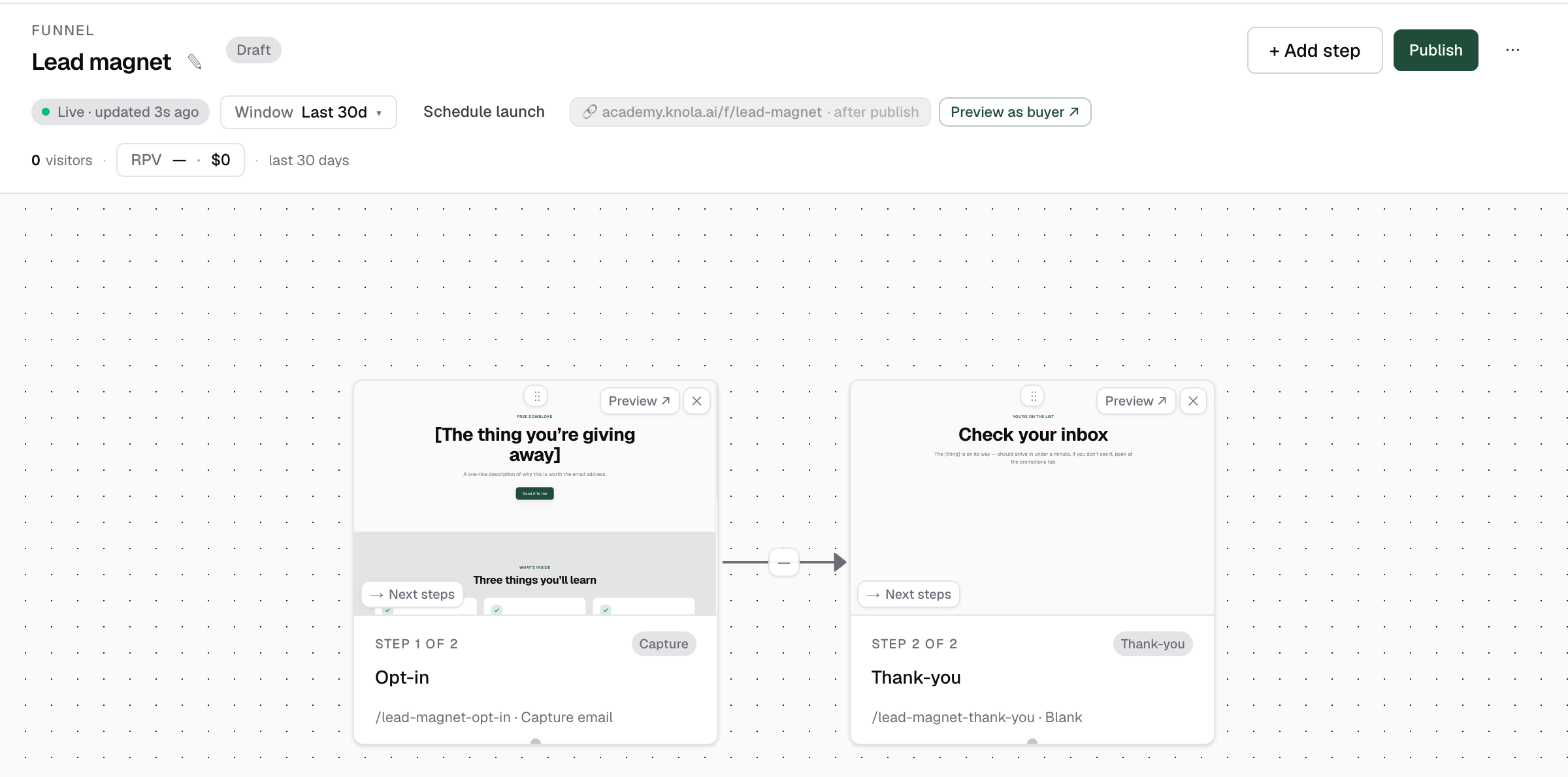
The Lead magnet template is a sign-up page and a thank-you page with their download.
New to offers? An offer is the thing a funnel sells: the price, and what the buyer gets. If you haven't built one yet, read How to build an offer, end to end first, then come back; the funnel wires itself around the offer, so everything here makes more sense once one exists.
Publish, unpublish and the public /f/ link
A new funnel starts as a Draft. Click Publish in the canvas header to take it live, or schedule a launch to open the doors at a set time. Knola first checks the structure, and if anything is broken you get a Fix these before publishing list with a jump link to each affected step. Once live, the status pill flips to Published and visitors enter at the funnel’s public link, which looks like yourschool.knola.site/f/your-funnel/your-page.
You can walk the whole flow before publishing: Preview as buyer ↗ opens the opening step in a new tab, and drafts are visible to you (only you) at the /f/ link. Unpublish takes the funnel offline again. Its pages stay published individually until you unpublish each in the page builder.
Do I need a funnel to sell a course on Knola?
No. A course can sell from its own sales page or a payment link without any funnel. A funnel earns its keep when you want more than one step: capture the email first, add an order bump or upsell, or send paid traffic through a controlled flow.
Can Knola AI build the whole funnel for me?
Yes. On the New funnel page, describe what you’re launching (price, course, the steps you want) and click Generate funnel. AI composes the structure, writes the pages and wires the steps together; you review everything on the canvas before publishing.
What happens to my pages if I unpublish a funnel?
The funnel goes offline, but its pages remain published individually. To take a page down too, unpublish it in the page builder.