

How to create coupons & discount codes
Add percent-off or fixed-amount discount codes to any offer, see when each code is live, and remove codes the moment a promotion ends.

 By Knola3 min read
Discount codes belong to one offer and apply to the whole order: main price, bump and all. You can add them while composing (the Add discount codes toggle) or any time afterwards from the offer detail page, which is what this guide covers.
Open the offer's discount codes
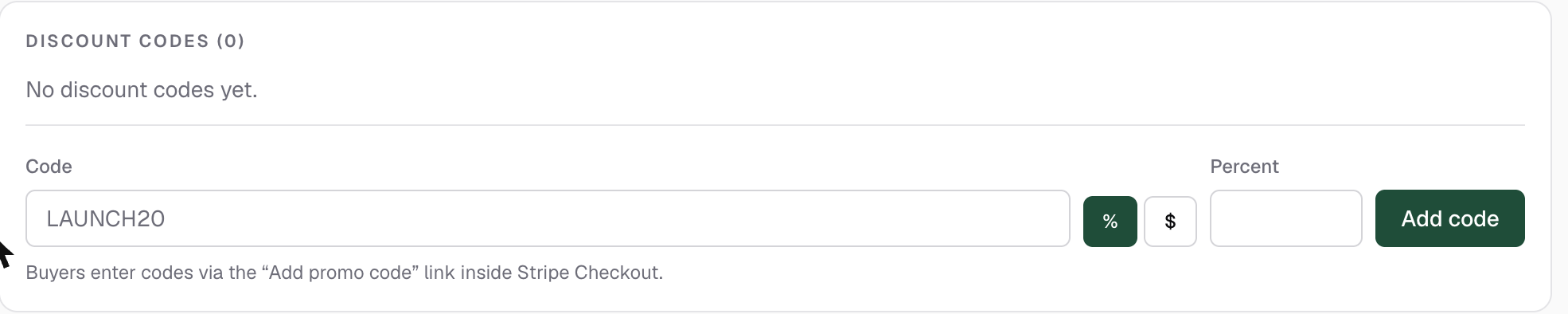
In your admin, go to Offers, open the offer, and stay on the Setup tab. The Discount codes card lists every code on this offer with its discount and scope ("20% off · whole order", for example).
Add a code
In the Code field, type the code, for example LAUNCH20: 2 to 40 characters, letters, numbers, underscore or dash; it uppercases as you type. Pick % or $, enter the Percent (1–100) or Amount $, and click Add code.
LAUNCH20, PODCAST10) and you can tell at a glance where each redemption came from.Check the code is live
Each code carries a status badge. Live means it has reached your connected Stripe account and buyers can redeem it right now. Sync pending means it is saved but waiting. Codes reach Stripe when the offer goes live, so a draft offer holds its codes until you hit Go live.
Codes are created as Stripe promotion codes, so redemption counts for each code live in your Stripe dashboard, alongside what each code earned you.
Remove a code when the promotion ends
Click the ✕ next to a code to remove it. It stops working immediately (the matching Stripe code is invalidated too), and past purchases are untouched.
How do buyers enter a discount code?
Through a discount link: your funnel link with ?code= and the code on the end. The discount is applied at checkout, to the whole order, before they pay.
Why didn't my code work when a buyer typed it in at checkout?
Codes typed into the promotion code box on the Stripe checkout page don't work on Knola checkouts. Send the buyer a discount link instead: the same link with ?code= and the code on the end applies it for them.
Why does my code say Sync pending?
The code is saved but the offer has not gone live yet. Codes reach Stripe when the offer does. Hit Go live on the offer and the badge flips to Live.