Here's how pricing works: one-time, plans and subscriptions
Understand the four ways an offer can bill (once, in monthly instalments, monthly or annually) and what buyers see and keep in each mode.

 By Knola5 min read
Every leg of an offer (the main price, an upsell, a downsell) picks one billing mode in the composer: Once, Plan, /mo or /yr. The mode decides what the buyer is charged, for how long, and what happens to their access if payments stop. Order bumps are the one exception: they are always one-time.
Where the price is set
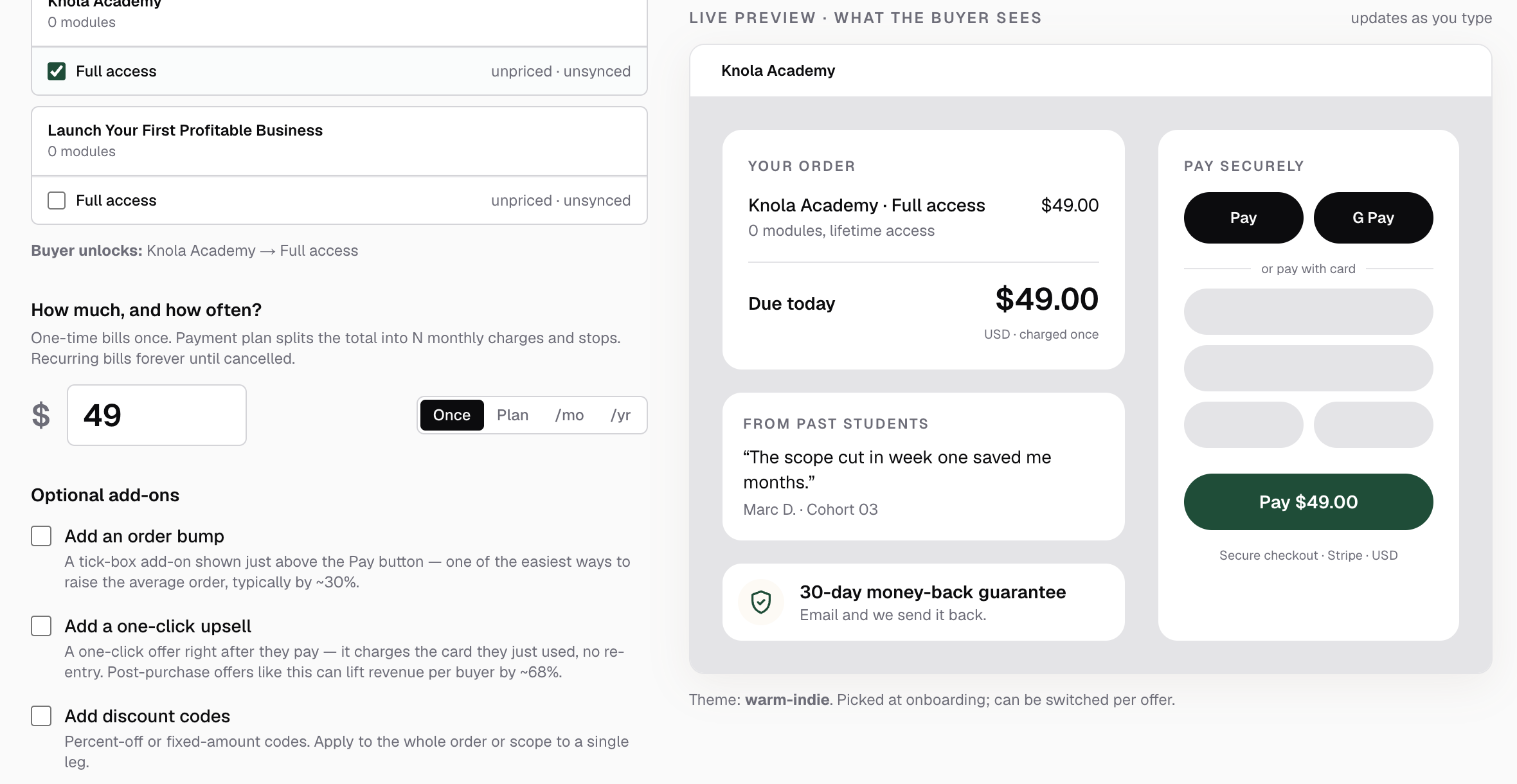
All of this lives in one place: the offer composer's How much, and how often? section. Type the price, pick the mode beside it (Once, Plan, /mo or /yr), and the live preview on the right shows exactly what the buyer will see for whichever mode you pick.
One-time: pay once, keep it
The default, and the right choice for most courses. The buyer is charged once and keeps access for good. The checkout shows the price with "charged once" beneath it. Nothing recurs, nothing lapses, no cancellation emails ever.
Payment plan: the total, split monthly
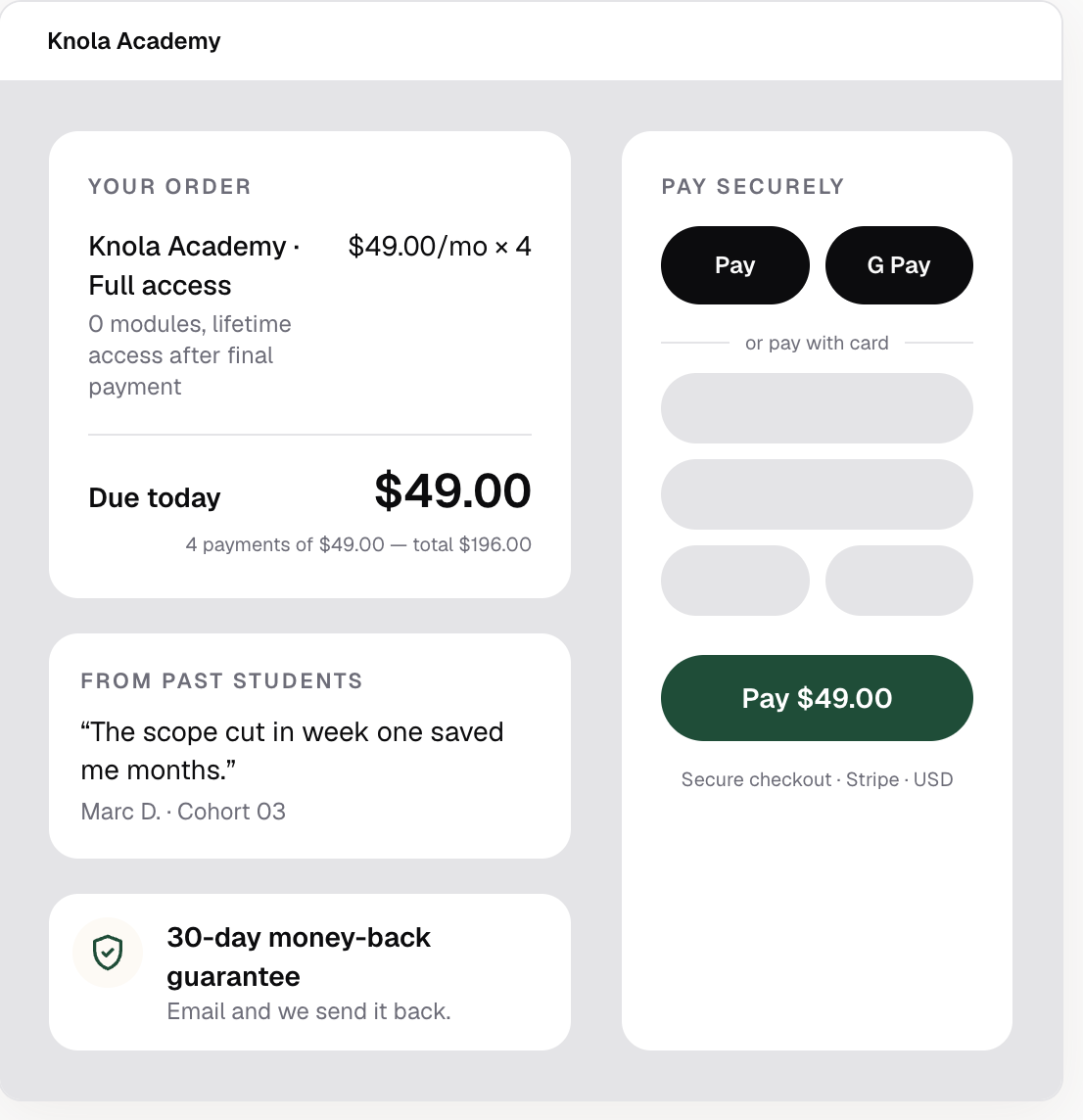
Pick Plan and set the Number of monthly payments (2 to 24). The price you enter is the per-instalment amount: the composer shows "Buyer pays $X/mo × N — total $Y" so there is no ambiguity about what you are charging. Under the hood it is a monthly subscription that auto-cancels after the final payment. The buyer never has to remember to cancel, and keeps lifetime access after the last instalment clears.
Payment plans shine on higher-ticket offers where a single charge would stall the sale. A checkout can also present a plan alongside the full price: wire a payment-plan offer into the checkout step and buyers get a Pay in full / N payments toggle to choose between them.
Monthly and annually: true subscriptions
Pick /mo or /yr and the buyer is billed on that cycle until they cancel. Access lasts while the subscription is active; if a payment lapses or they cancel, access ends automatically. That trade-off is the point: recurring revenue in exchange for content you keep fresh, a membership, or a community that is worth renewing.
Both cycles accept Free-trial days (optional). With a trial, nothing is due at checkout. The preview shows "Free for N days, then $X/mo". Without one it reads "Then $X/mo — cancel anytime".
Charge in your own currency
You are not limited to dollars. The Currency picker at the top of the New offer screen offers USD, GBP, EUR, CAD and AUD. The price you type, the live preview and the checkout all use the currency you pick, and any fixed-amount discount codes on the offer inherit it too.
How buyers see each mode
The checkout order summary spells out the commitment next to the price:
- One-time: the price, "charged once", and lifetime access.
- Payment plan: "N payments of $X — total $Y", with lifetime access after the final payment.
- Monthly / annually: the recurring price, any trial, and access while the subscription is active.
Everything is set up in your connected Stripe account when the offer goes live, so buyers pay inside the same secure Stripe checkout in every mode. Manage the offer itself with Offers: build one end to end.
Can I offer a payment plan and a pay-in-full price on the same checkout?
Yes. Wire a payment-plan offer into the checkout step alongside the main offer and buyers get a Pay in full / N payments toggle at checkout.
What happens if a buyer on a payment plan stops paying?
Their access ends automatically when a payment lapses, the same as any subscription. Buyers only earn lifetime access once the final instalment clears.
Can I charge in a currency other than US dollars?
Yes. Pick the currency at the top of the New offer screen: USD, GBP, EUR, CAD or AUD. The price, the checkout and any fixed-amount discount codes all follow the currency of the offer.
Can an order bump be a subscription?
No. Bumps are always one-time charges. Stripe doesn't allow a second recurring price in the same checkout, so the composer only offers one-time bumps.