Here's how Knola is organised: schools, admin and students
Understand how Knola fits together: your school on its own subdomain, the admin and student views, and one account that works across every school.

 By Knola4 min read
Knola is a platform for building and selling courses, and it's organised around one idea: your school. A school is your own site (courses, sales pages, funnels, students) living on its own web address. This guide maps the territory so nothing in Knola feels mysterious.
Your school lives on its own subdomain
Every creator gets a school at you.knola.ai. You pick the name when you set your school up. That subdomain is the address for everything your students see: your school page, your sales pages, your courses. The main site at knola.ai is where Knola itself lives: pricing, these guides, and the sign-in page.
The admin view: where you build
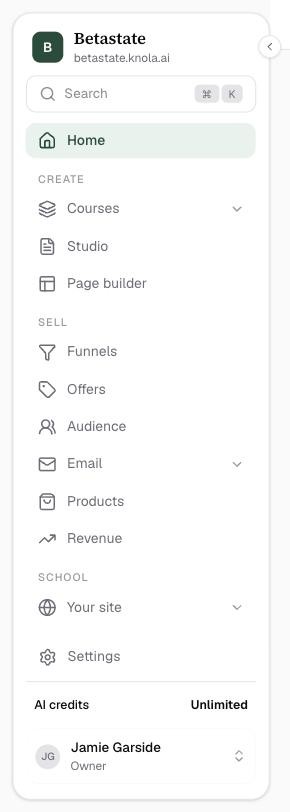
When you open your school's /admin, you get the creator's side of Knola. The sidebar is grouped by job, not by feature:
- Home. Your dashboard: KPIs, recent activity and, while you set up, the setup checklist.
- Create. Courses, Studio and Page builder: everything you make, including the downloads Knola writes from your lessons.
- Sell. Funnels, Offers, Audience, Email, Products and Revenue: how you package, price, sell and see the results.
- School. Your site (your Home page choice and School page) and Students (all students, Discussions, Insights and Emails).
- Settings sits at the foot of the sidebar, above your AI credits. See Every settings page, and how to find a setting.
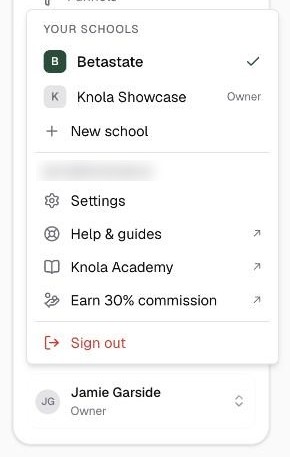
Press ⌘K, or click Search at the top of the sidebar, to jump straight to any screen. Your name at the bottom opens the account menu: switch between Your schools, start a New school, open Help & guides (this library) or Knola Academy, the method course every plan includes.
The student view: where they learn
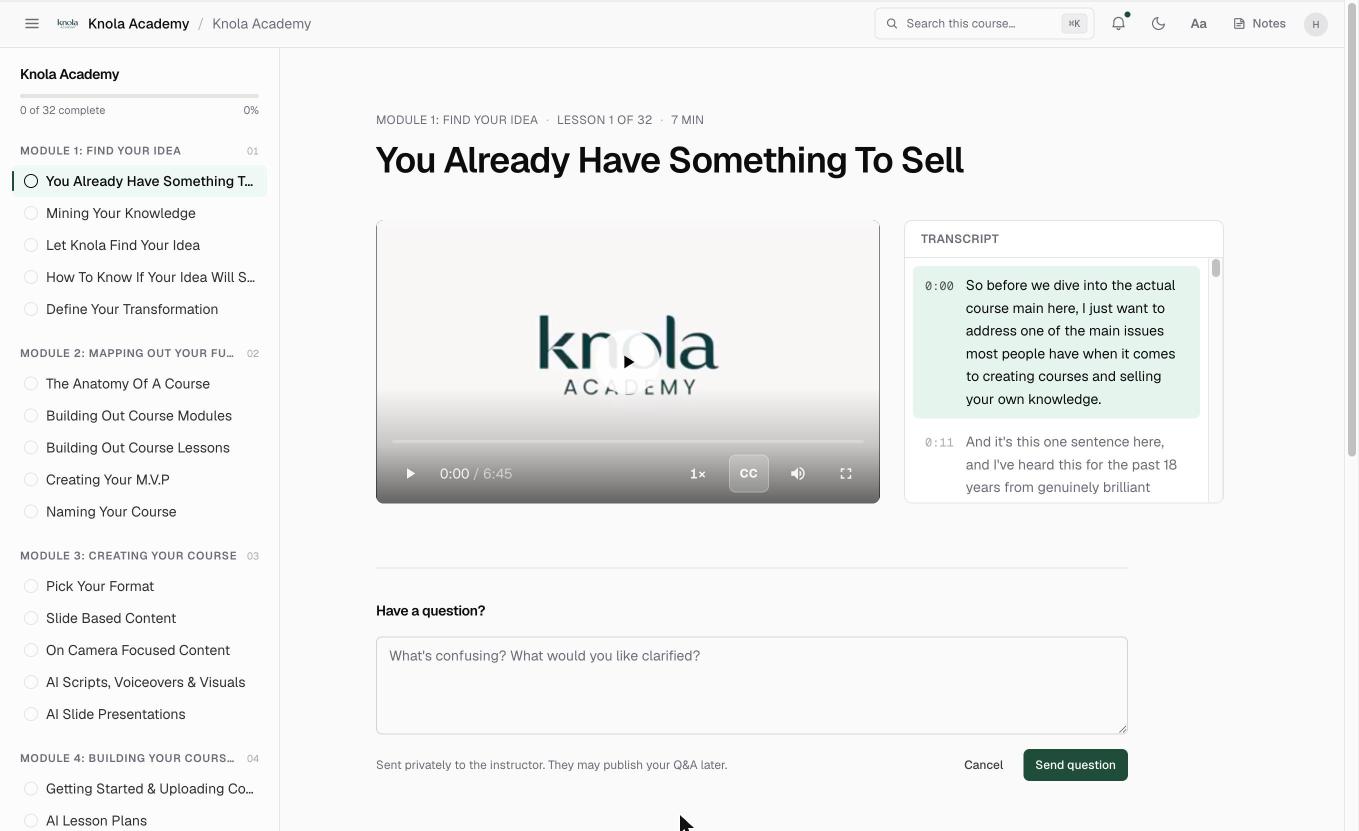
Your students never see the admin. They get a clean course player under your school's name: the course menu on the left, the lesson in the middle, and a top bar with Notes (their own notes across the course) and, on courses with the AI Tutor enabled, a Tutor panel that answers questions from your content.
To see exactly what they see, click Preview at the top of any course, or View as a student on a lesson. It opens the real lesson experience.
One account across every school
A person signs up for Knola once. Every course they buy (from you or from any other Knola creator) lands in that same account. If you run more than one school, or you study in someone else's while running your own, the account menu at the bottom of the sidebar lists them all under Your schools; one click switches.
Sign-in always happens at knola.ai/login. From there, one account opens every school you belong to, as admin or as student.
Can I run more than one school on one Knola account?
Yes. Each school is separate, with its own subdomain, courses and students, and your account menu lists every school you belong to under Your schools, with New school to start another. How many schools you can sell from depends on your plan.
Do my students need their own Knola account?
They need one Knola account, ever. They sign in once at knola.ai and every course they buy (from you or any other creator) lives in that same account.
What is the difference between knola.ai and my subdomain?
Your subdomain (you.knola.ai) is your school: everything your students and buyers see. knola.ai is the platform: pricing, guides and the sign-in page.