

How to create invite links
Create a shareable link that auto-enrols anyone who opens it (with optional max uses and expiry) and revoke it the moment it has done its job.

 By Knola4 min read
An invite link is a URL that enrols whoever opens it. You don't need their email addresses up front, which makes it the right tool wherever people arrive on their own: a payment confirmation from your own processor, a community pin, a cohort announcement, a partner's newsletter.
Create the link
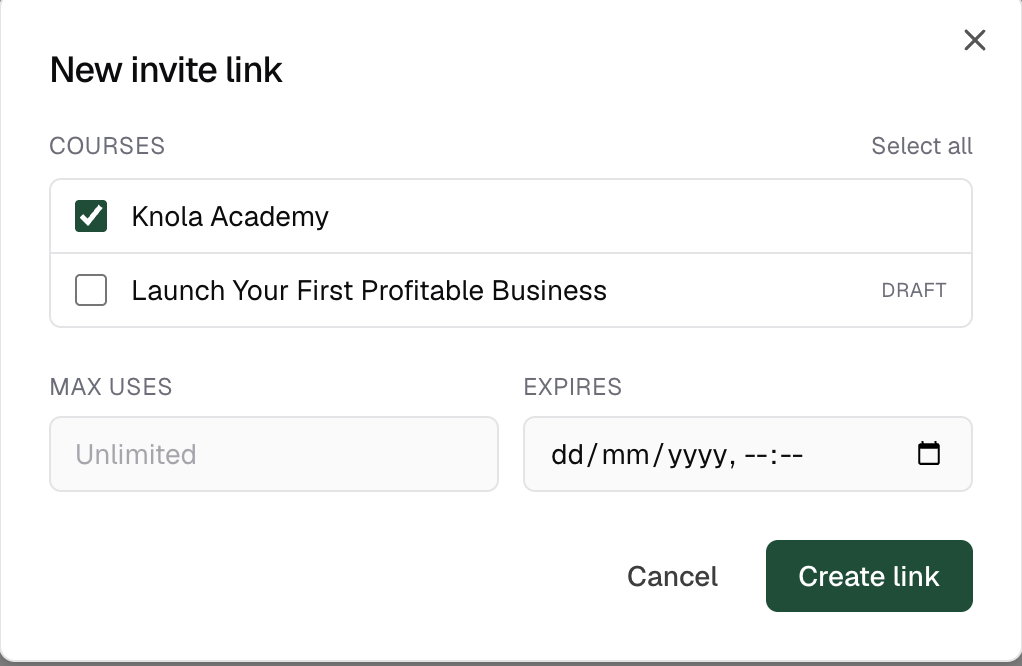
Go to Students → Invite links and click Create invite link. In the New invite link dialog, tick the Courses the link should open (or Select all), then set two optional limits: Max uses (leave it on Unlimited or cap it, e.g. at the size of a cohort) and Expires, a date and time after which the link stops working. Click Create link.
Know what the recipient sees
The link opens a public page on your school: "You've been invited to [course]" with your logo and the course covers. A visitor who is already signed in is enrolled and dropped straight into the first course, no extra click. A new visitor signs in with Google or a magic link to their email; the account is created on the way through, and the invite is accepted automatically when they land back on the page.
Revoke it when it has done its job
Click Revoke on the row. The link stops working immediately. Anyone already enrolled through it keeps their access. Recipients who open a dead link see a plain message telling them to ask you for a new one; the same applies to expired and used-up links.
Can one invite link enrol someone into several courses?
Yes. Tick as many courses as you like when creating it. One click enrols the recipient into all of them, and the welcome email links to each.
What happens when an invite link expires or hits its max uses?
It simply stops enrolling. Visitors see that the invite has expired or is full and are told to ask you for a new one. Everyone already enrolled keeps their access.
Do people need a Knola account before using an invite link?
No. The join page signs them in with Google or a magic link and creates the account as part of accepting the invite: one sign-in, and the courses are in their account.