

How your email sends are counted
Learn what counts as an email send, where to see how many you have left, what happens if you run out, and how to top up with a send pack that never expires.

 By Knola5 min read
Every email you send to your list uses one send. Knola keeps count for you, shows you what is left wherever you write, and stops a broadcast before it goes out rather than halfway through. This page explains what counts, where to look, and what to do when you need more.
What counts as a send
One email to one person is one send, from a broadcast or a flow. A broadcast to 800 people uses 800 sends. A flow with three emails uses three sends for each person who goes all the way through it.
These don’t use any sends:
- Email me a test, and tests sent to someone on your team.
- Automatic emails Knola sends for you, such as receipts, course access links and reminders.
- People a broadcast leaves out because they have already had your weekly limit of emails (Most emails one person gets in a week, in Settings ▸ Email).
- Emails that never go out. Anyone who has unsubscribed or whose address bounced is checked again at the moment of sending, and those sends come back. So do emails that fail, and the rest of a broadcast you stop with Stop sending.
Monthly sends and extra sends
Your sends come in two kinds, and Knola uses them in this order:
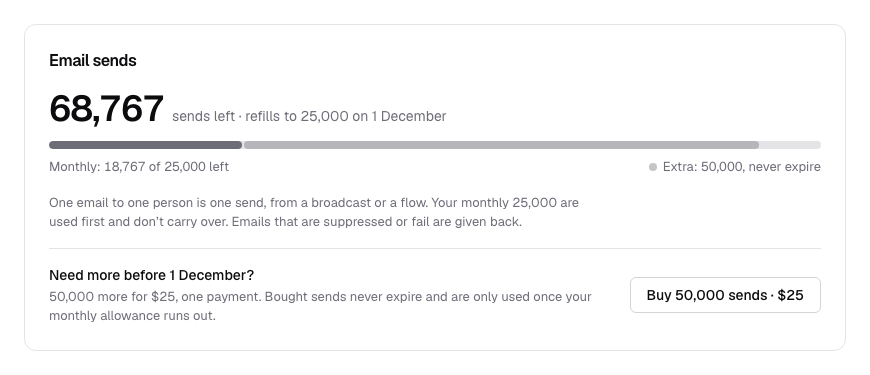
- Monthly: if your plan includes sends each month, they come back on the 1st. Whatever you don’t use is gone at the end of the month; it doesn’t carry over.
- Extra: sends from a send pack. They never expire, and they are only used once the month’s sends run out, so what you paid for lasts longest.
If all your sends are extra sends, there is no reset date: they stay until you use them. Settings says so: “These don’t run out at the end of the month.”
Where you see what’s left
The same count shows in several places, so you always know before you send:
- The broadcast you are writing: the card on the right, above Send to, shows Email sends with what you have left and how many this one uses. If your sends come back monthly, it also says when: Resets on and the date.
- Broadcasts: the same meter appears on the Broadcasts page, above your list of broadcasts, when you are running low.
- Email ▸ Overview: the foot of List health says how many sends are left, and when they reset.
- Settings ▸ Email: the Sends section, with a Plan & billing button.
- Settings ▸ Plan & billing: the Email sends section has the full picture. The big number is everything you can send right now. Under the bar, Monthly shows what is left of this month’s sends and Extra shows your send pack balance.
When you are running low
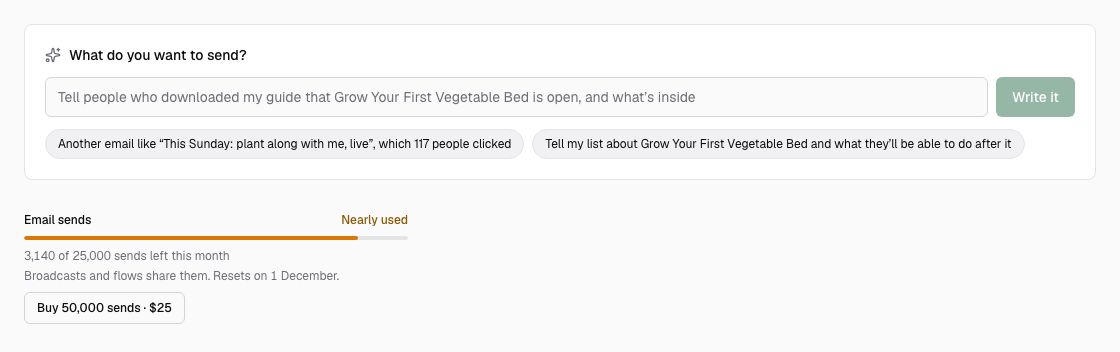
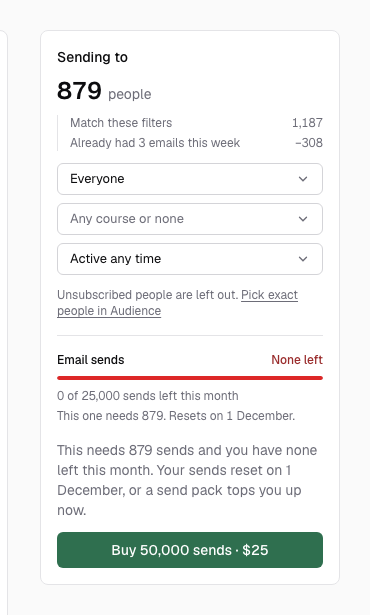
When you are down to the last fifth of a month’s sends (counting any extra sends), the meter turns amber and says Nearly used. When there are none left it turns red and says None left. On the Broadcasts page and in the broadcast you are writing, a button to buy more appears beside it.
If you run out
A broadcast never runs out partway through its list: it either has the sends for everyone, or it doesn’t start. What happens depends on what is sending:
- A broadcast you are sending now: if it needs more sends than you have, the Send button is replaced with a sentence saying how many sends it needs and how many you have left, and, if your sends come back monthly, when they reset. Your draft is kept. Buy more and send it, or wait for the reset.
- A scheduled broadcast: the sends are taken when its time comes, not when you schedule it. If there aren’t enough then, it goes back to being a draft with the reason at the top, and the school’s owner gets an email saying it didn’t go out.
- A flow: each person waits on the email they are due, and Knola tries again every hour. Once you have sends again, everyone carries on from where they stopped, and nobody drops out of the flow.
Top up with a send pack
Click Buy 50,000 sends · $25. You’ll find it in the Email sends section of Plan & billing, and beside the meter in the broadcast you are writing when you need it. It’s one payment, not a subscription, and the sends never expire.
Buying from a broadcast saves your draft first and brings you back to it after you pay, so you can send straight away. The sends usually land within a minute: the composer then says 50,000 sends added. You’re ready to send., and Plan & billing says 50,000 sends added. They’re ready to use.
Do test emails count towards my sends?
No. Email me a test and tests to your team never use a send, however many you send.
Do unused email sends roll over to next month?
No. Monthly sends come back on the 1st and don’t carry over. Sends from a send pack are different: they never expire and are only used once the month’s sends are gone.
Do receipts and course emails use my sends?
No. Only broadcasts and flows count. The automatic emails Knola sends for you, such as receipts, access links and reminders, don’t use any.
What happens to my flows if I run out of sends?
They pause where they are and pick up again as soon as you have sends. Knola checks every hour, so everyone carries on from the email they were due, and nobody falls out of the flow.
Do I lose sends if a broadcast fails or I stop it?
No. Emails that don’t go out (to someone who unsubscribed or bounced, ones that fail, or the rest of a broadcast you stop) come back to your balance.