

How to mark each buyer's PDF so a shared copy can be traced
Stamp every PDF you sell with the buyer's own order code, see a sample on your own file, and trace a copy that turns up somewhere it should not be.

 By Knola4 min read
When you sell a PDF, every buyer normally gets the same file, so a copy passed around a group chat tells you nothing about where it came from. With stamping on, each buyer downloads their own copy with their order code at the foot of every page. If that copy is shared, you can look up which order it was made for.
Open the product that holds your PDF
In your admin, go to Products and click the product. Its files are listed under What they get. If the PDF is not there yet, click + Add file and upload it.
Turn on "Stamp each buyer's copy"
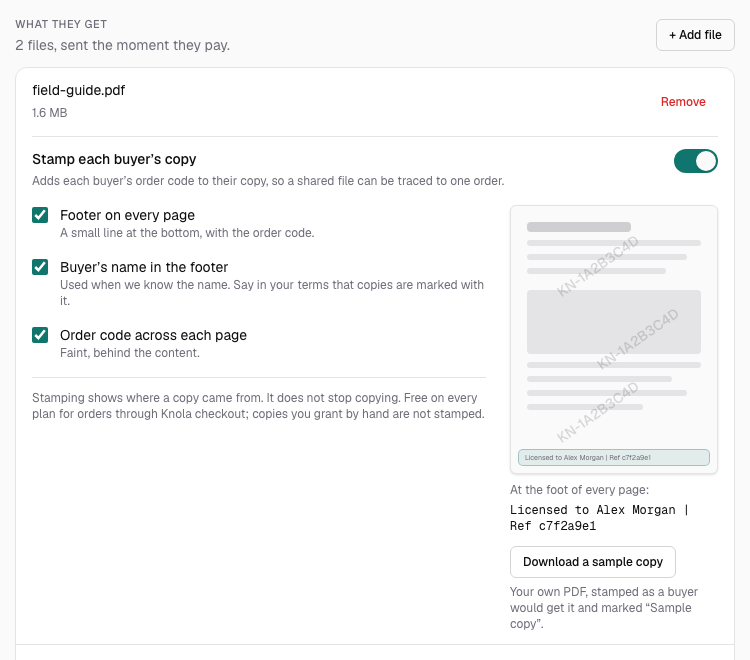
Under the PDF, switch on Stamp each buyer’s copy. Knola reads the file first, and you will see "Checking that this PDF can be stamped…" for a moment. Then the options and a small page preview appear.
Each PDF has its own switch, so you can stamp the workbook and leave a one-page bonus as it is. Only PDFs can be stamped.
Choose what goes on the page
There are three options. The preview beside them changes as you tick, so you can see what each one does.
- Footer on every page: a small grey line at the bottom of each page with the order code and a copy ID, such as "Licensed to order KN-1A2B3C4D | Ref c7f2a9e1". On by default.
- Buyer’s name in the footer: shows the buyer's name in place of the order code, when Knola knows it. If you use this, say in your terms that copies are marked with the buyer's name.
- Order code across each page: repeats the order code faintly behind the content of every page.
With the footer off, the copy still carries a hidden ID you can trace. The footer is what puts people off sharing, so leave it on unless your design has no room for it.
Check a sample on your own file
Under the preview, click Download a sample copy. Knola stamps your real PDF with the options you chose and downloads it, so you can check where the footer lands on your own pages before a buyer sees it.
A sample is marked "Sample copy" in place of an order code. Turn the pages and check the footer does not sit on top of your own page numbers or footer text. If it does, add a little more bottom margin in the tool you made the PDF with and upload it again.
Know what your buyer sees
Nothing changes at checkout. On their order page the buyer clicks Download, sees "Preparing your copy…" for a second or two, and gets the file. Under the file, the page tells them: "Your copy carries your order code in the footer of each page. Please keep it to yourself."
A buyer who downloads again gets the same copy with the same code.
Does stamping stop people sharing my PDF?
No. It makes a shared copy traceable to one order, which puts most people off. Someone determined can still photograph the pages or crop the footer away, so treat it as a deterrent and a way to find the source, not a lock.
Does PDF stamping cost extra?
No. It is free on every plan for orders that go through Knola checkout.
Will stamping change how my PDF looks or works?
Only by the marks you choose. Your pages, links and fillable form fields stay as they are. Use Download a sample copy to see the result on your own file.
What if I turn stamping on after people have already bought?
Earlier buyers get a stamped copy the next time they download from their order page. A file they already saved stays as it was.