

How to cancel or change a live session
Move a live session to a new time, stop taking sign-ups, cancel it and refund everyone, or delete it, and know what each person is told.

 By Knola3 min read
Plans change. Each of these asks you first, and tells you what happens to the people who have booked.
Move it to a new time
Open the event from Live. Under Settings, click Change on the When row and set the new date or time. When people are booked, Knola asks you to confirm before it saves.
Everyone with a seat gets an email with the new time, and their reminders go again for it. Their place is kept.
Stop taking sign-ups
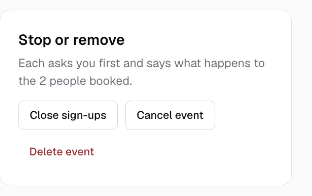
At the bottom of the event's screen is Stop or remove. Stop selling, for a paid event, or Close sign-ups, for a free one, closes the page to new people. Everyone already booked keeps their place, and the call still happens.
Cancel it
Click Cancel event, or Cancel and refund for a paid one. For a paid event, choose Refund everyone in full or Don't refund now. You can add A note in the email (optional) to say why.
Calls still to come are cancelled, sales and reminders stop, and everyone with a seat gets an email. With refunds, each person's refund is tracked on the event's screen and tried again if it fails.
Delete it
Delete event removes the page and its calls. It works only when nobody has booked and nothing was recorded, so nobody needs to be told. If people have booked, cancel it. If a call was recorded, the event stays with its recordings.
Run it again
A call that never ran is under Past on the Live screen, marked as not run. Run it again opens it with a new date to set.
How do I cancel a webinar and refund everyone?
Open the event, click Cancel and refund, choose Refund everyone in full and confirm. Everyone with a seat is emailed. Only the school's owner can refund.
Are people told when I change the time?
Yes. Everyone with a seat gets an email with the new time, and their reminders are sent again for it.
Why can I not delete my event?
An event can be deleted only when nobody has booked and nothing was recorded. Cancel it, or stop selling it, in place of deleting.