

How to sell the recording of a live session
Turn a finished live session into something you sell: put a price on the recording, collect the people who ask for it, and send it to them.

 By Knola3 min read
People keep arriving at your event page after it is over. You decide what the page does for them: sell the recording, give it away for an email, or take names for the next one.
Open When it's over
Open the event from Live. The When it's over card is on the right of Overview. You can set it before the call or after.
Choose what the page does
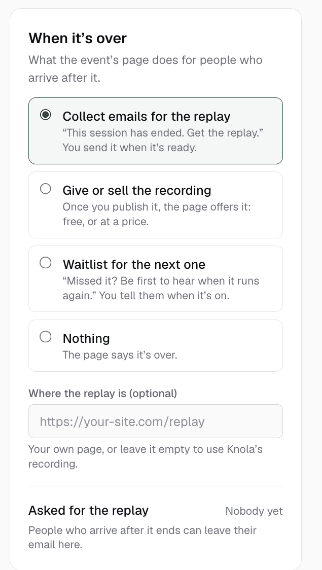
A free event has four choices. The first takes emails for the recording, and you send it when it is ready. Give or sell the recording offers it on the page, free or at a price. Waitlist for the next one takes names for when it runs again. Nothing says the event is over.
A paid event has three: sell the recording, Waitlist for the next one, or Nothing. A paid recording is never given away for an email.
Set a price
Type the price and save it. It is in your school's currency, the lowest price is 0.50, and 0 makes the recording free.
The recording goes on sale after the last call, once you have published a recording. From then the event's page sells the recordings in place of tickets. A buyer gets every recording you publish for that event.
Send it to the people who asked
People who arrive before the recording is ready can leave their email. The card lists them, with Waiting or Sent beside each. When you publish the recording, or put a price on it, they are emailed. For a recording you host somewhere else, add its link and send it from the same list.
Change the price or stop selling
Change price opens the price. The link under it stops the sale. People who already bought keep what they bought.
Three more ways a recording earns
- Put a button under the video. On the recording's Page tab, Under the video sells one of your products to everyone who watches.
- Run it again by itself. Make it evergreen turns it into an evergreen webinar.
- Make it a lesson. See how to put a live recording in a course.
Can I sell the recording of a webinar?
Yes. Set a price in When it's over on the event. After the last call, the event's page sells the recording.
Do people who bought a ticket have to buy the recording?
No. A ticket includes every recording you publish for the event.
Can I give the recording of a free webinar away for an email?
Yes. A free event can take emails for the recording, and each person joins your contacts. A paid recording is never given away for an email.