

How to publish a live session recording
Check the recording of your live session, fix its words, set up its page, publish it to the people who signed up, and download the file.

 By Knola5 min read
A recorded call becomes a video with a transcript and notes. It is a draft, and only you can see it. Nothing goes to anyone until you publish.
Wait for it to be ready
After the call, the event's screen shows a card with three steps: Recording saved, Making the video and transcript and Ready for you to check. It is usually ready 10 to 30 minutes after the call, and Knola emails you when it is.
Watch it and check the words
Click Watch to see it through. Then open the Words tab. It has two parts, Notes and Transcript. The notes are written from the transcript and go under the video.
Fix anything that was misheard: Edit changes one line, and Find and replace, in the notes and the transcript changes a word everywhere. Words to spell right is a list of names for Knola to get right in every call from now on.
Set up its page
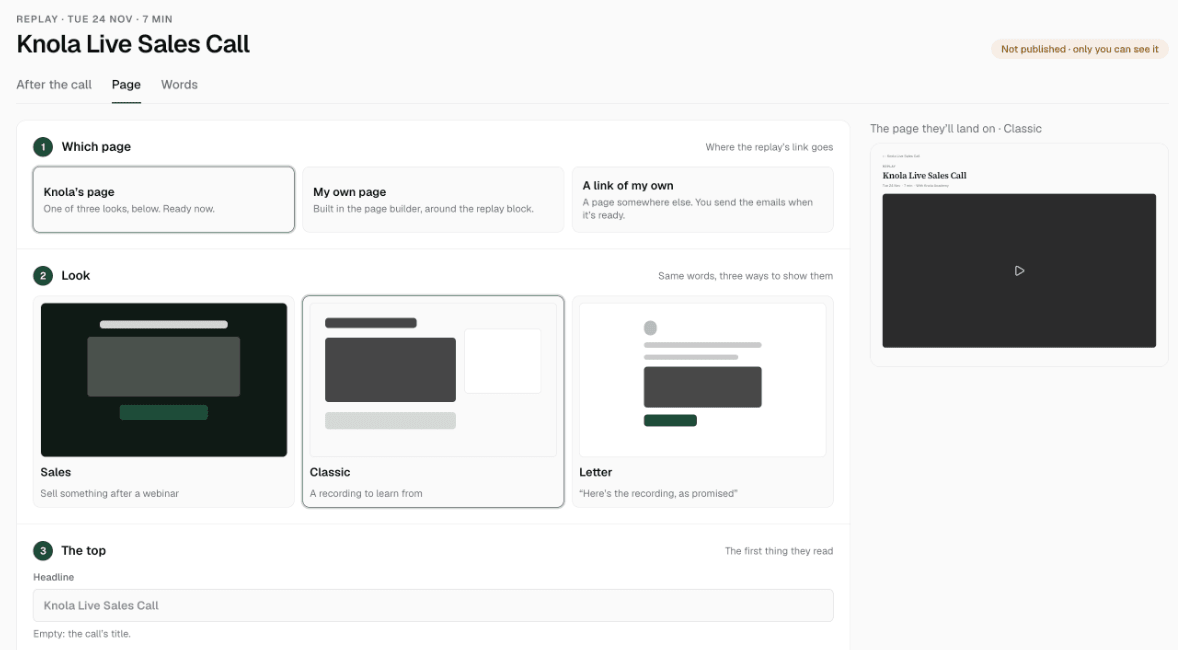
The recording plays on its own page in your school. Open the Page tab to set it up.
- Look: Sales, Classic or Letter.
- The top: a Headline and one line under it.
- Under the video: one button. Choose a product under Sell, or a link of your own.
- Chapters: Suggest from the transcript drafts them, and you can rename, retime or delete any.
- Who can watch: for a free recording, Ask for their email first adds each new viewer to your contacts.
Publish it
On the After the call tab, Who gets it has a tick box for the people who came and one for the people who missed it. When sets the moment: As soon as it's ready, Tomorrow at 09:00 or a time you pick. Then click Publish and send now.
The card on the event's screen is quicker: its main button publishes and emails everyone with a seat, and Publish, don't email publishes quietly. Everyone with a seat can then watch from their own link.
Download the file
Click Download on the recording to save the original video file, to use anywhere you like. The original file can be downloaded for 7 days after the call. After that the button says "Downloads last 7 days after the call." The recording itself still plays in your school.
Find every recording
In the sidebar, Live has two items. The second one lists every recorded call, newest first, with a search box and filters for To publish and Published. A recording you do not publish stays there.
Delete a recording
The bin on a recording deletes its video for good: nobody can watch or download it, including you. The call, who came, and its notes and transcript stay. A recording that students can see in a course, or that plays as an evergreen webinar, has to come out of there first.
Who can watch the recording once I publish it?
Everyone with a seat. For a free event you can also let anyone with the link watch, or ask for their email first.
How long can I download my webinar recording?
The original file can be downloaded for 7 days after the call. The recording still plays in your school after that.
Does Knola make a transcript of my live session?
Yes. Every recorded call gets a transcript and notes, and you can correct both before you publish.