

How to sell coaching and take bookings
Sell one to one coaching from your school: set the hours you can be booked, the package and the price, and let clients pick their times.

 By Knola5 min read
Clients buy a session or a package, then book a time from the hours you offer. There is no back and forth to find a slot, and each session runs in your school.
Start a coaching package
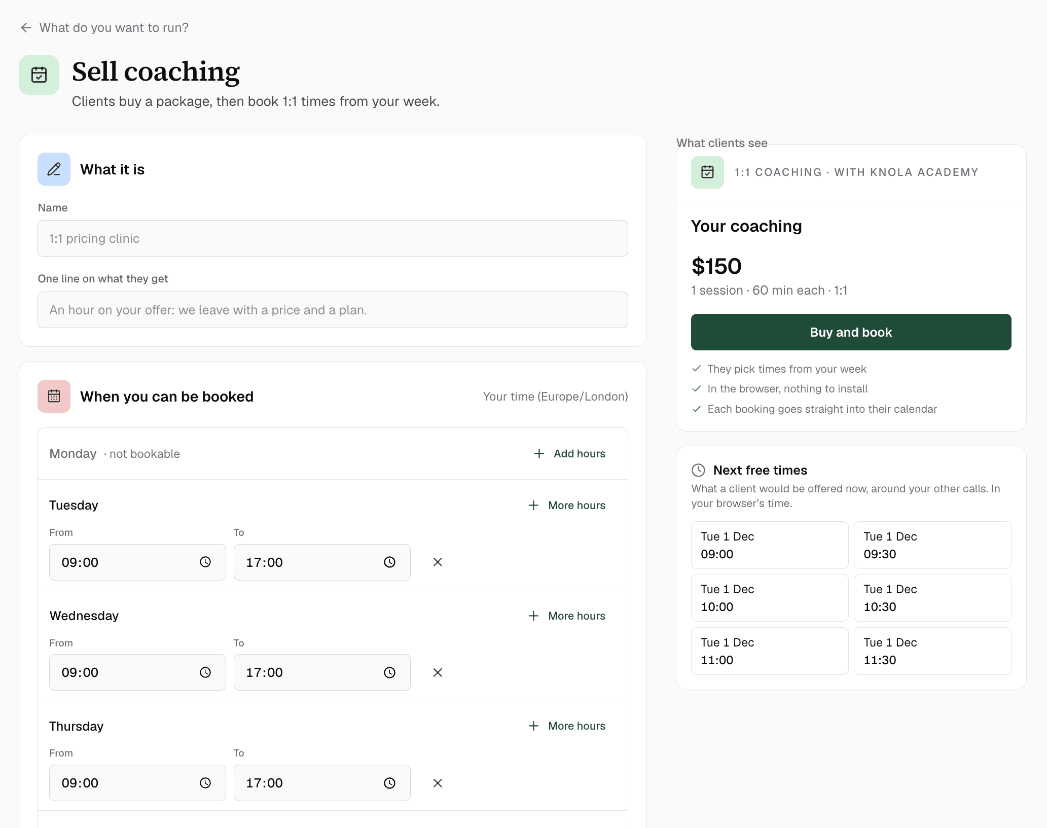
Click Live, then Create, then Coaching package. Give it a Name and One line on what they get.
Set when you can be booked
Under When you can be booked is a week. For each day, click Add hours and set From and To. Add a second set of hours to a day for a split day. The times are yours, and clients see them in their own time zone.
- Least notice: how far ahead a booking must be, from 2 to 72 hours.
- Break between sessions: time kept free around each session.
- Bookable up to: how far ahead clients can book, from 14 to 90 days.
A time is not offered when you have another call in your school then. Next free times, on the right, shows what a client would be offered now.
Set the package and the price
Under The package, set the Price, Sessions in the package (1 to 12) and the length of Each session (30 minutes to 2 hours). With Record sessions on, each session's recording, transcript and notes go on your client's page, and they get their own copy.
Questions before their first session are answered once, before the client books, so you can prepare. Use three good starters fills in three for you. Click Put it on sale.
How clients book
Share the link with Copy link. On the page, the client clicks Buy and book, pays, answers your questions, and picks a time. They get an email with a calendar file, and reminders the day before and an hour before. You get an email for each booking.
Clients can move or cancel a session themselves, up to your notice time before it starts. A cancelled session goes back to them to book again.
Run your sessions
Open the package from Live. Coming up lists each booking, with what the client wants to cover and an Open the room button. Only you and that client can join. Cancel tells the client and gives the session back to them.
Change your week edits your hours. Stop taking clients closes the package to new buyers, and the page takes emails for when you open again. If you see Connect Google Calendar, connecting it keeps your busy times from being offered and puts each booking in your calendar.
Keep track of each client
Click a name under Clients for that client's page: every session, newest first, with its recording and notes, and what you Agreed. Ask about answers a question from your recorded sessions with that client only, and shows the moments the answer came from.
Can clients book coaching calls with me through Knola?
Yes. They buy a package and pick times from the hours you set. Each booking is emailed to both of you.
Can a client reschedule a session?
Yes. They can move or cancel it themselves, up to your notice time before it starts.
Can I sell a single coaching session?
Yes. Set Sessions in the package to 1. A client who wants more can buy again.