

What Knola Live is and what you can run
See every kind of live session you can run in your school with Knola Live, where each one starts, and what Knola sets up for you.

 By Knola4 min read
Knola Live runs live sessions inside your school: webinars, workshops, calls for your students, cohort calls and one to one coaching. People join in the browser, with nothing to install, and you do not send a meeting link from another tool.
Where Live is
Click Live in the sidebar, under Create. The first time, you see Run your first live call with a Set up a call button. After your first call, the screen leads with Next up, the call that is coming, and lists everything you run under Coming up and Past. List and Calendar switch how the calls coming up are shown.
At the top are two buttons: Create, to plan something, and Go live now, to start a call this minute.
What you can run
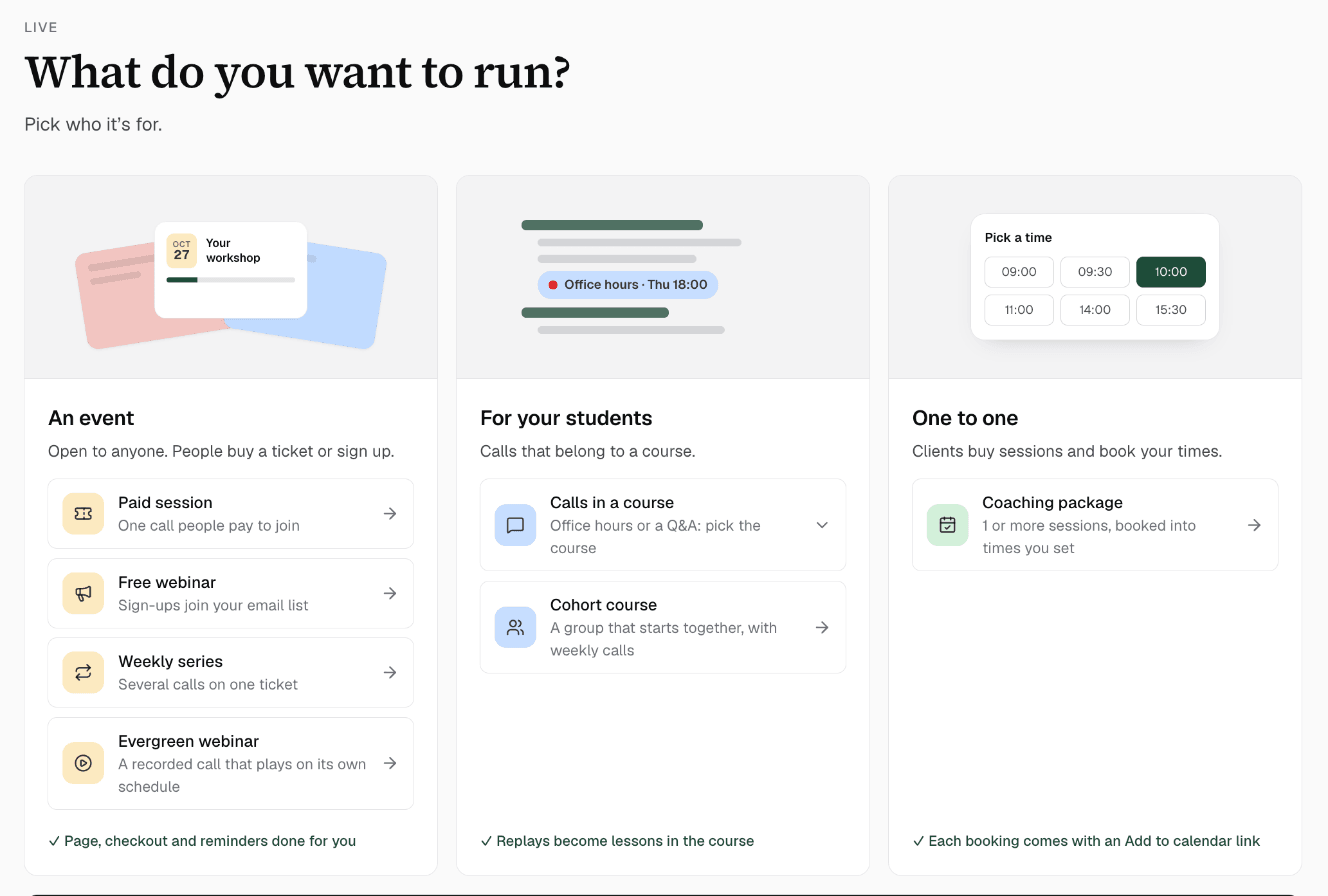
Create asks What do you want to run? and shows three cards, by who it is for.
- An event: open to anyone. Paid session is one call people pay to join. Free webinar is a call people sign up to, and every sign-up joins your email list. The third tile, Several calls on one ticket, is a series. Evergreen webinar is a recorded call that plays on its own schedule.
- For your students: Calls in a course adds office hours or a Q&A to one course. Cohort course sells a course to a group that starts together, with calls only they can join.
- One to one: Coaching package sells one or more sessions that clients book into times you set.
Each has its own guide: create a session, charge for one, evergreen webinars, calls in a course, cohort courses and coaching.
Webinar or workshop
Every call is one of two formats, and you can change it before the call.
- Webinar: you present, they watch and ask. Their camera is off, and they raise a hand to speak.
- Workshop: everyone can talk, camera if they like. People join muted and can unmute.
What Knola sets up for you
You give a title, a date and, for a paid session, a price. Knola makes the page people sign up on, takes the payment through your checkout, and sends the confirmation and the reminders. The call is recorded unless you switch that off, and the recording waits as a draft that only you can see.
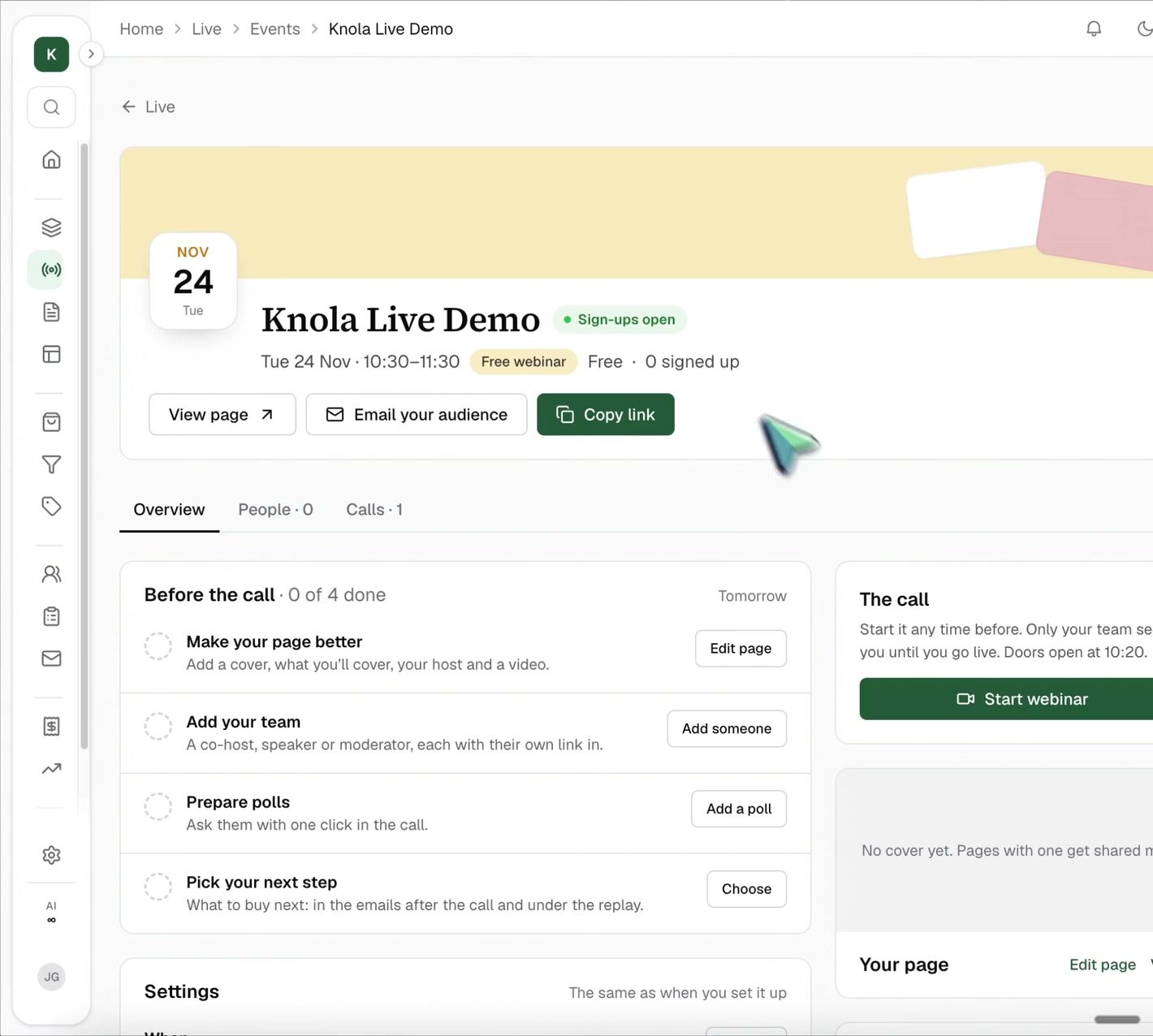
Each event has its own screen with three tabs: Overview, People and Calls. Before the call lists four optional jobs: your page, your team, your polls and the next step you want people to take.
After the call
When you end a call you see how it went: who signed up, who came, how long they stayed and what they asked. Knola writes a transcript and notes from the recording. Then you choose what the recording does: publish it to the people who signed up, sell it or put it in a course as a lesson.
Do people need to install anything to join a Knola Live session?
No. They join in the browser, on a phone or a computer, from a link on your event page or in their emails.
Can I charge for a live session in Knola?
Yes. Choose Paid session, set a price, and Knola makes the ticket page and the checkout. See how to charge for a live session.
Are Knola Live sessions recorded?
Yes, unless you switch recording off for that call. The recording is a draft that only you can see until you publish it.