

How to run a cohort course
Sell one of your courses to a group that starts together: set the calls, the price and the places, then keep the whole cohort on track.

 By Knola4 min read
A cohort is one of your courses, sold to a group with a start date and live calls only that group can join. People finish because they started together.
Start a cohort
Click Live, then Create, then Cohort course. A cohort runs on a course you already have, so make the course first.
Choose the course and the calls
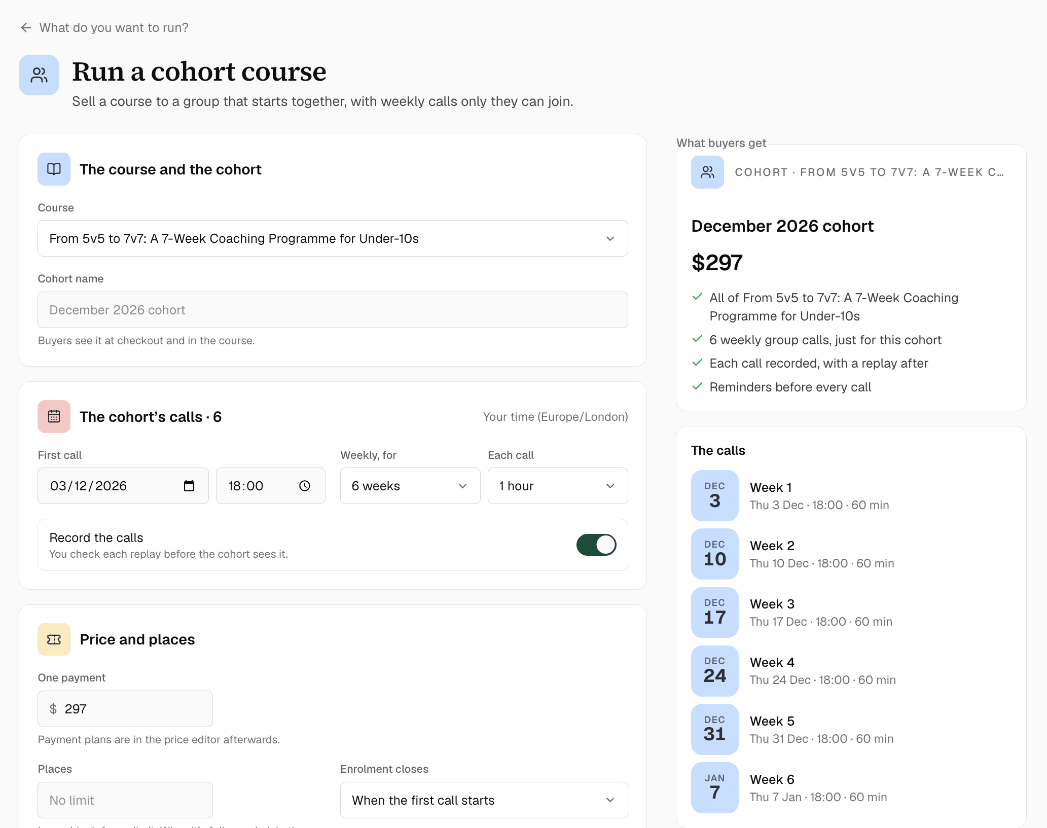
Pick the Course and give the group a Cohort name. Buyers see the name at the checkout and in the course.
Set First call, its date and time. Then choose how many weeks the calls run for, from 4 to 12, and the length of Each call. Knola makes one call a week from the first one. Record the calls is on unless you switch it off, and you check each recording before the cohort sees it.
Set the price and the places
Type the price under One payment. Payment plans are in the price editor afterwards. Places limits the group; leave it blank for no limit. Enrolment closes has three choices: When the first call starts, A week after it starts or Keep selling while it runs.
Click Put the cohort on sale. You get the link to share, with Copy link.
What buyers get
A buyer gets all of the course, a place in the cohort and its calls. They see the calls on the course page, with Add to calendar, and get a reminder before each one. Nobody outside the cohort can join those calls, even with full access to the course.
When the cohort is full, or enrolment has closed, the page takes emails for the next one. Make the course's next cohort and everyone waiting gets one email with its link.
Keep the cohort on track
Open the cohort from Live. Four numbers lead the screen: In the cohort, Calls held, Came to calls and Falling behind. Someone is falling behind when they miss the last two calls, are behind on the lessons, or have been quiet for 10 days.
The roster lists every member with their calls, lessons and last visit. Nudge sends one person a note from your school, with the next call and a button back into the course. Message the cohort writes to everyone. Replies come to you.
Change the places or the closing date
Places and enrolment on the same screen changes Places and Enrolment closes while the cohort is on sale. Places cannot go below the number of people already in.
Can I run a cohort based course in Knola?
Yes. Cohort course sells one of your courses to a group with a start date, limited places and its own live calls.
What happens when a cohort is full?
The page stops selling and takes emails for the next one. When you make the next cohort of that course, everyone waiting is emailed its link.
Can someone outside the cohort join its calls?
No. The calls are for that cohort only.